Vulnerabilities
Vulnerability management: patch first what attackers actually exploit
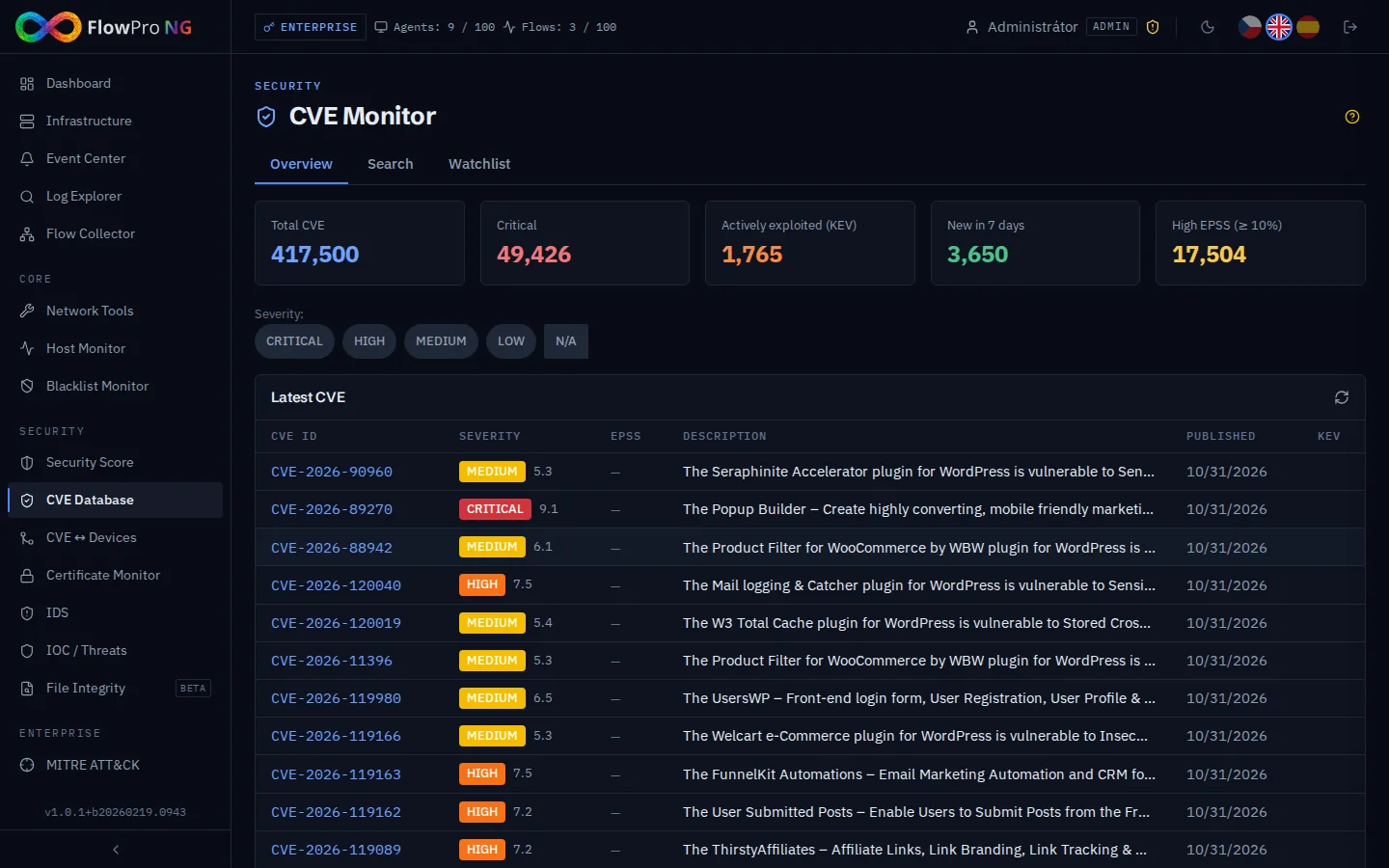
Tens of thousands of new vulnerabilities a year. You cannot patch them all at once.
By CVSS alone, so many vulnerabilities are "critical" that the list never shrinks, yet most of them are never exploited in practice. A small team needs to know which flaws affect its own devices and which ones attackers already use.
That is why FlowPro NG combines three sources: CVSS says how severe a flaw is, EPSS estimates how likely it is to be exploited, and the CISA KEV catalogue confirms that it already is. NIS2 also requires vulnerability handling, so a record of what you have fixed helps too.
What you get
Vulnerability management in FlowPro NG
Local CVE database from NVD
After installation, all records are downloaded from the NVD API 2.0 (hundreds of thousands of CVEs); after that only changes are fetched every hour. Search by CVE ID, keywords, vendor, product or date.
CISA KEV catalogue
Vulnerabilities that the US agency CISA lists as actively exploited carry a KEV flag in lists and detail views. The catalogue is refreshed with every sync.
EPSS scores
Once a day each CVE gets its EPSS score from FIRST: the probability of exploitation in the next 30 days. You can filter and sort by EPSS.
CVEs matched to devices
The CVE ↔ Assets module compares CVEs with the operating systems, software and models of your devices. For each device you see the vulnerabilities that affect it with severity, CVSS, EPSS and KEV.
Remediation status and export
Set a status for each CVE and device pair: open, in progress, resolved or accepted risk. Export the whole table to CSV for an audit or a patch plan.
Product watchlist
Add the vendors and products you use, or specific CVEs, to the watchlist. When a new vulnerability appears for a watched product, you get an alert.
- CVE
- NVD API 2.0
- CISA KEV
- FIRST EPSS
- CVSS v3.1
- CPE
- Elastic Agent
- NIS2
How it works
Up and running in a few steps
- 01
Enable the CVE module
It is part of the Security license and above. The server needs outbound access to NVD, CISA and FIRST. The first download takes a while, later updates are quick.
- 02
Keep your asset inventory
Devices running the Elastic Agent register themselves; add the rest manually. The more accurate the OS and software versions, the more accurate the CVE matching.
- 03
Work by priority
Start with vulnerabilities flagged KEV, then high EPSS combined with high CVSS. Record the remediation status right on the device.
FAQ
Frequently asked questions
What is EPSS?
What is the CISA KEV catalogue?
What is the difference between CVSS and EPSS?
How does FlowPro NG know which CVEs affect my devices?
Does information about my devices leave my network?
Related solutions
Try it on your own network
The 14-day Enterprise trial unlocks every module. You install it on your own server, no credit card needed.