13
Event Center
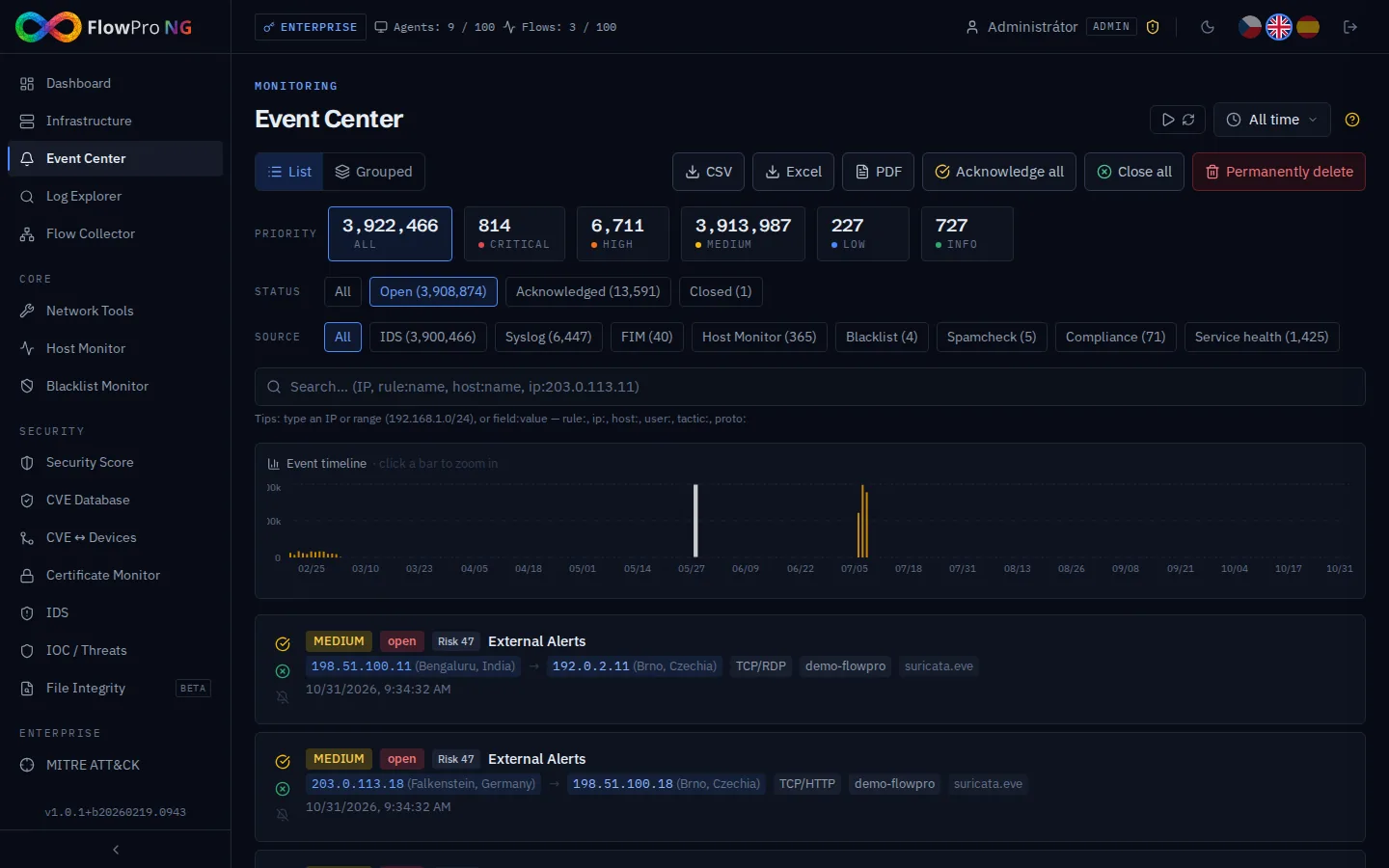
Event Center — overview
The Event Center is used for managing security alerts and system events. It enables tracking, classifying, and resolving security incidents with a complete workflow.
Event types
Security alerts
Alerts generated by Elastic Security detection rules. They contain information about the detected threat, source, target, and severity.
| Severity | Description | Example |
|---|---|---|
| Critical | Active attack or compromise | Ransomware detected, reverse shell |
| High | Serious security threat | Brute-force attack, privilege escalation |
| Medium | Suspicious activity | Unusual network traffic, new process |
| Low | Informational notification | Configuration change, new connection |
System events
Events generated by FlowPro NG itself. The "System events" tab displays internal notifications from various sources:
| Source | Description | Examples |
|---|---|---|
| service_health | System service outages and recoveries | Elasticsearch DOWN, PostgreSQL RECOVERY |
| compliance | Compliance check results | NIS2 score dropped below 80% |
| uptime | Monitored service status changes | Web server DOWN, DNS monitor UP |
| password_audit | Email breach check results | Email found in breach database |
System events have their own severity (critical, high, medium, low, info) and can be filtered and managed just like security alerts.
Workflow
Each alert goes through a lifecycle (state diagram):
- •Open — new, unresolved alert
- •Acknowledged — the alert has been noted and is being handled
- •In Progress — actively being resolved
- •Resolved — resolved
- •False Positive — marked as a false alarm
The status can be changed individually or in bulk using bulk operations. Status changes are logged for audit trail.
Cascade filters
The stat cards at the top function as cascade filters. Clicking on a card activates the filter and other cards are recalculated:
- •Click on severity card (e.g. Critical) — filters alerts of that severity
- •Click on status card (e.g. Open) — filters alerts of that status
- •Combination — severity + status can be combined (e.g. Critical + Open)
- •Cancel filter — clicking the card again deactivates the filter
Bulk operations
For efficient management of large numbers of alerts, bulk operations are available:
- •Bulk status change — select multiple alerts and change their status at once
- •Bulk delete — remove selected alerts
- •Select All — select all alerts on the current page
- •Filter + bulk — first filter and then perform a bulk operation on the result
Comments
Comments can be added to alerts for sharing information within the team. Comments support text format and display the author, date, and time.
Filtering and searching
Alerts can be filtered by:
- •Severity — severity level (critical, high, medium, low)
- •Status — workflow state (open, acknowledged, in_progress, resolved, false_positive)
- •Time range — when the alert was created
- •Source — source hostname or IP
- •Full-text — search in alert description
Muted rules
Detection rules that generate too many false alarms can be muted. Muted rules stop appearing in the alert list but continue to be recorded in Elasticsearch for potential auditing.
Notifications
FlowPro NG can send notifications about new alerts to external channels. Notification channel configuration can be found in Settings → Notifications. Supported channels:
- •Telegram — bot messages to a channel or group
- •Slack — messages via webhook
- •Email — SMTP notifications
- •ntfy.sh — push notifications to mobile
- •Webhook — custom HTTP endpoint