32
NIS2 AI Advisor
NIS2 AI Advisor — overview
NIS2 AI Advisor is a RAG-based chatbot specialized in the NIS2 directive (EU 2022/2555). It allows asking questions about NIS2 requirements in natural language and receiving answers backed by specific articles and paragraphs of the directive. The module combines vector search (pgvector) with a large language model for accurate and contextual answers.
Enterprise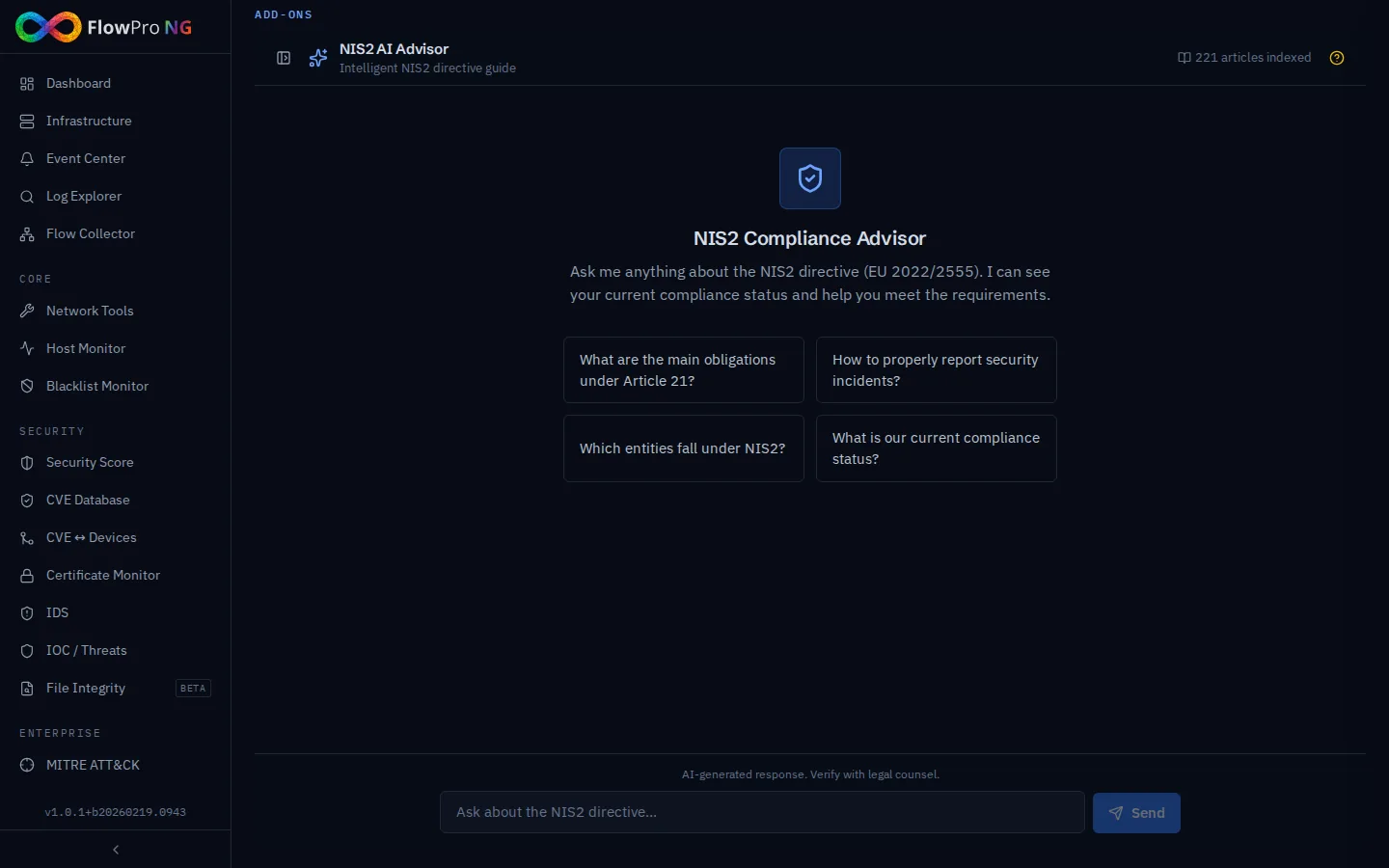
RAG pipeline architecture
The system uses a Retrieval-Augmented Generation (RAG) pipeline to generate answers based on the actual text of the NIS2 directive:
- •The user query is converted to a vector embedding using the nomic-embed-text model
- •The most relevant parts of the directive are searched from the PostgreSQL database (pgvector, cosine similarity, top-5)
- •The found context along with the current compliance status is passed to the LLM model
- •The LLM generates an answer with references to specific directive articles
- •Answer tokens are streamed in real-time via WebSocket
Knowledge base
| Parameter | Value |
|---|---|
| Total parts (chunks) | 221 semantic blocks |
| Number of categories | 18 thematic categories |
| Embedding model | nomic-embed-text (768 dimensions) |
| Vector index | HNSW (pgvector) |
| Storage | PostgreSQL 16 with pgvector extension |
4-layer prompt
Answers are generated using a 4-layer prompt that ensures accuracy and relevance:
- •System prompt — NIS2 expert role, response language, formatting
- •Compliance context — current score, failed controls, last evaluation
- •Relevant directive parts — top-5 results from vector search
- •User query — the actual question in natural language
User interface
Conversations
The interface is designed as a classic chat client with a left conversation panel and a main message area:
- •New conversation — button to start a new query
- •Conversation history — list of previous conversations sorted by date
- •Archiving — option to archive older conversations (archive/restore button)
- •Deletion — permanent removal of a conversation with confirmation
- •Collapsible panel — the left panel can be hidden for more chat space
Welcome screen
When opening a new conversation, a welcome screen appears with a feature overview and 4 suggested questions for a quick start:
- •What are the main obligations under Article 21?
- •How to properly report security incidents?
- •Which entities fall under NIS2?
- •What is the current state of our compliance?
Messages and answers
- •Streaming answers — tokens are displayed in real-time via WebSocket
- •Markdown formatting — answers support lists, tables, highlighting and citations
- •Article references — clickable links to specific NIS2 directive articles/recitals
- •Article detail — clicking a reference opens a modal window with the full article text
- •Metadata — for each answer: model used, token count, processing time
- •Stop button — option to stop answer generation
Sources
Each answer contains a sources section with references to specific parts of the NIS2 directive from which the LLM drew when generating the answer:
- •Article — link to a specific directive article with number
- •Recital — link to an introductory recital of the directive
- •Relevance score — percentage match with the query
- •Text preview (snippet) — short excerpt from the relevant part
Status information
Current status information is displayed at the top of the interface:
| Indicator | Description |
|---|---|
| Score | Current compliance score from the last evaluation run (%) |
| Failed controls | Number of controls that failed the last evaluation |
| Last evaluation | Date and time of the last compliance run |
| Knowledge base | Number of indexed NIS2 directive articles (221 blocks) |
Directive article links
The system automatically detects and linkifies references to NIS2 directive articles in chatbot responses. Clicking a link opens a modal window with the full article text.
- •Automatic detection — the system recognizes formats like "Article 21", "Art. 21"
- •Recitals — references to directive recitals are also supported
- •Modal window — displays section, article number, name, category and full text
- •Part count — the number of semantic chunks is shown for each article
Integration with other modules
NIS2 Compliance
The AI Advisor is closely integrated with the NIS2 Compliance module:
- •Compliance context — the current score and failed controls are automatically included in the prompt
- •Evaluation data — answers reflect the results of the last compliance run
- •Cross-reference — answers refer to relevant controls in your compliance framework
AI Analysis
The AI Advisor shares infrastructure with the AI Analysis module:
- •Same LLM backend — Ollama (local) or cloud proxy (api.net-service.io)
- •Model — qwen2.5:72b (default) or gpt-oss:120b
- •Rate limits — shared with AI Analysis according to license tier
- •Configuration — AI model settings in Settings → AI
Tips for effective use
- •Ask specific questions — "What are the obligations under Article 21?" is better than "What does NIS2 say?"
- •Ask about compliance status — the AI Advisor sees your current results and can suggest specific steps
- •Use references — clicking on an article link takes you to the full text
- •Archive conversations — archive important conversations for later reference
- •Verify answers — AI answers are guidance, not legal advice