DocumentationDeployment
10
CLI Commands
CLI Commands
FlowPro NG includes command-line tools for system administration. These commands are installed automatically with the flowpro-server package and are available in /usr/local/bin/.
| Command | Description |
|---|---|
| flowpro-status | Displays system status — installed packages, services, database schema, and quick health check |
| flowpro-reset-password | Lists users and resets forgotten passwords |
The flowpro-status command provides a comprehensive overview of the FlowPro NG system health. It checks installed packages, service status, database schema versions, and performs a quick health check of Elasticsearch, the backend API, and disk usage.
bash
flowpro-status
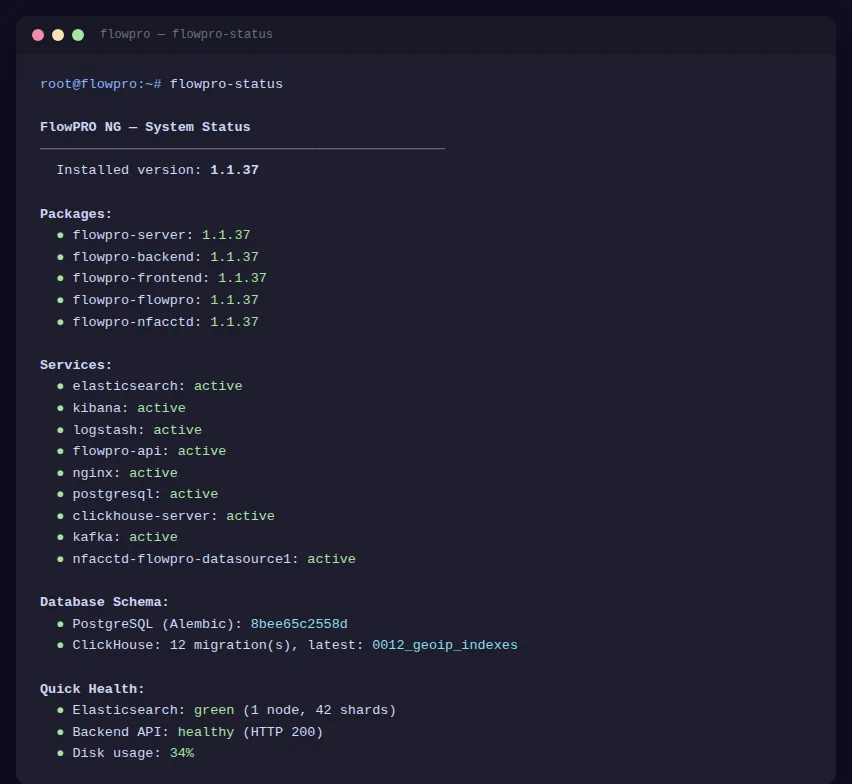
Output sections:
| Section | Description |
|---|---|
| Packages | Installed versions of all FlowPro .deb packages (flowpro-server, flowpro-backend, flowpro-frontend, flowpro-kafka, flowpro-geoip, flowpro-nfacctd, flowpro-honeypot) |
| Services | Status of all system services — green (active), red (inactive), yellow (not configured) |
| Database Schema | PostgreSQL Alembic revision and database migration count |
| Quick Health | Elasticsearch cluster health (green/yellow/red), Backend API status, disk usage percentage |
Run flowpro-status after every upgrade to verify that all packages, services, and databases are in a healthy state.
The flowpro-reset-password command allows administrators to list users and reset forgotten passwords directly from the command line. It connects directly to the local PostgreSQL database.
List users:
bash
flowpro-reset-password list
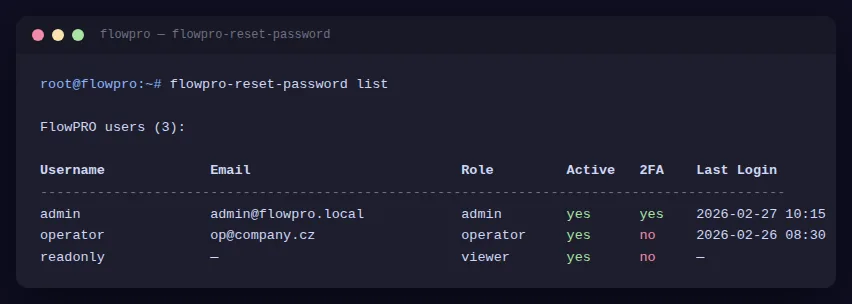
Available commands:
| Command | Description |
|---|---|
| flowpro-reset-password list | List all FlowPro users |
| flowpro-reset-password set <user> <pass> | Set new password for a FlowPro user |
Resetting a FlowPro user's password also disables their two-factor authentication (TOTP). The user will need to re-enable 2FA in Settings after logging in with the new password.
This command requires root or sudo privileges. It connects directly to the PostgreSQL database.