34
Settings
Settings — overview
The Settings page contains 11 tabs for complete system configuration. Most settings require the administrator role.
| Tab | Description |
|---|---|
| Users | Account management, roles, 2FA |
| Notifications | 5 channel types + delivery history |
| Databases | PG / ES / CH info, retention, connection test |
| Rules | Kibana Detection Engine — enable/disable, import/export |
| Firewall | UFW rules — add, remove, per-rule toggle |
| IP Ranges | Internal IP ranges (CIDR) for traffic classification |
| API Services | HIBP, VirusTotal, OTX — keys and health check |
| Flow Collector | nfacctd port, start/stop service, UFW rules |
| Honeypot | T-Pot agents, URL, API key, health, statistics |
| AI | Mode (local/cloud), model, auto-trigger, rate limits |
| License | Tier info, trial badge, agent usage, activation/deactivation |
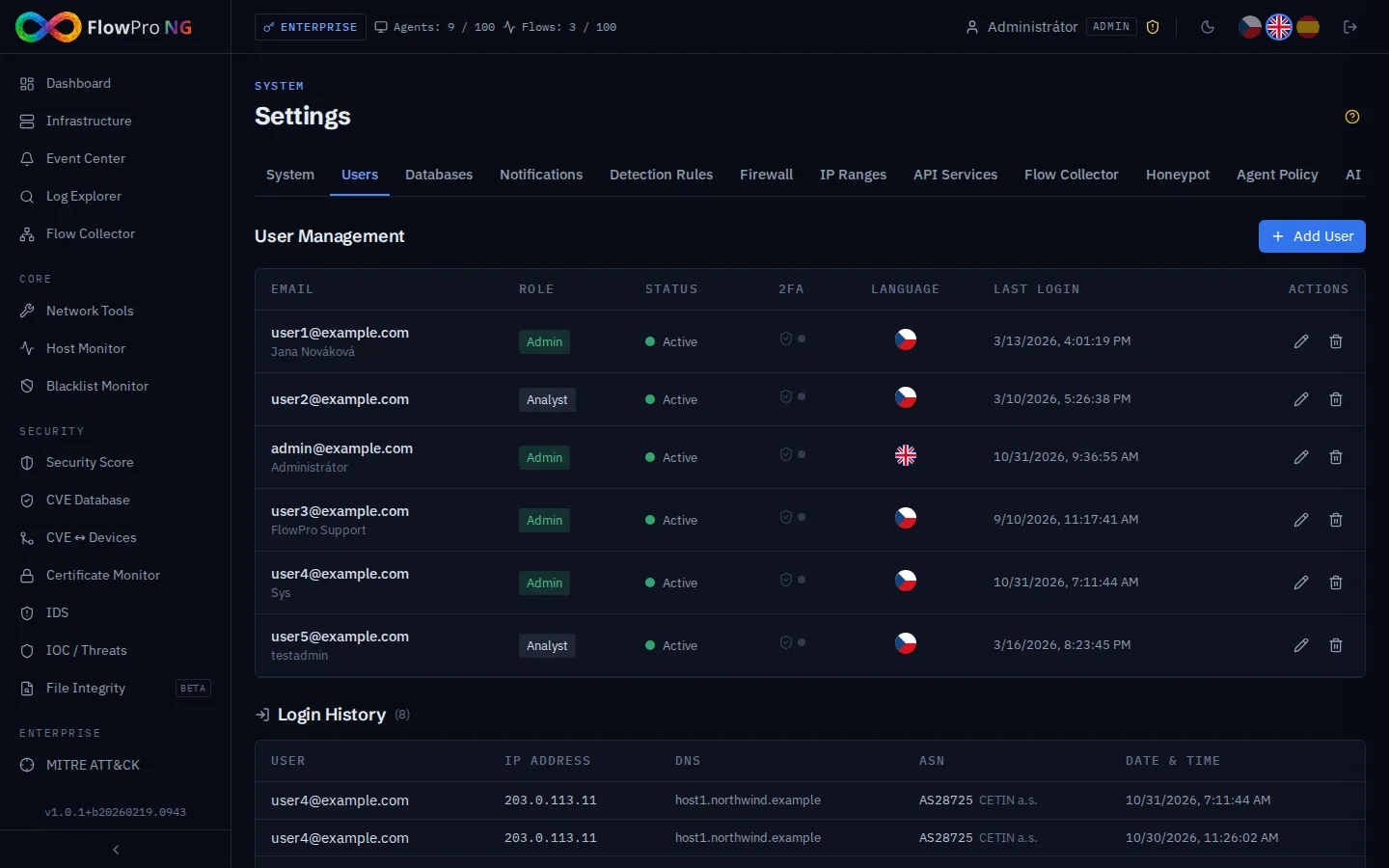
Tab: Users
FlowPro NG user account management:
- •Create user — name, email, role (admin / analyst / viewer)
- •Two-factor authentication (2FA) — TOTP via Google/Microsoft Authenticator
- •Change password — requires current password or admin privileges
- •Deactivation / deletion — deactivated user cannot log in
| Role | Permissions |
|---|---|
| Admin | Full access — settings, user management, everything |
| Analyst | Read + write — alerts, comments, analyses, export |
| Viewer | Read only — viewing dashboard, logs, alerts |
Login history
The bottom part of the tab displays a login history table:
- •User — who logged in
- •IP address — where from
- •Time — when
- •Result — success / failure
- •User agent — browser and device
Tab: Notifications
Configuration of notification channels for alerting. 5 channel types are supported:
Telegram
- •Bot token — token from @BotFather
- •Chat ID — channel or group ID
- •Test — send a test message
Slack
- •Webhook URL — incoming webhook from Slack workspace
- •Channel — target channel (optional, depends on webhook)
- •SMTP server — address and port (465/587)
- •Authentication — username and password
- •Sender — from address
- •Recipients — list of email addresses
ntfy.sh
- •Topic URL — URL to ntfy.sh server
- •Push notifications directly to mobile
Webhook
- •URL — custom HTTP endpoint
- •Method — POST (JSON payload with alert details)
Notification history
The bottom part of the tab displays the history of sent notifications with delivery result (success / error) and timestamp.
Tab: Databases
Database status overview and retention configuration:
| Database | Information |
|---|---|
| PostgreSQL | Version, table count, DB size, pool stats, connection test |
| Elasticsearch | Cluster status, indices, sizes, documents, ILM policies |
| Flow Database | Version, flow tables, size, record count |
- •Retention period — how long to keep logs (ILM policy in Elasticsearch)
- •Connection test — verify availability of each database
- •Index management — overview of indices, data streams, sizes
Tab: Rules
Management of Kibana Detection Engine rules for security threat detection:
- •Rules overview — list of all detection rules with description and status
- •Enable / Disable — activate and deactivate individual rules
- •Import rules — upload custom rules in NDJSON format
- •Export rules — download rules for backup or sharing
- •Mute — temporarily suppress a specific rule without deactivating it
Tab: Firewall
Management of UFW (Uncomplicated Firewall) rules directly from the web interface:
- •Rules overview — active allow/deny rules with numbers
- •Add rule — port, protocol (TCP/UDP/Both), source, action (allow/deny)
- •Per-rule toggle — temporarily disable a rule without deleting it (saved to DB)
- •Delete rule — permanent removal
- •IPv4 / IPv6 — support for both versions (v6 rules are deleted first)
Tab: IP Ranges
Definition of internal IP ranges for network traffic classification:
- •CIDR ranges — definition using CIDR notation (e.g. 192.168.1.0/24)
- •Range names — naming for easy identification (LAN, DMZ, servers...)
- •Traffic classification — distinguishing internal and external traffic in dashboards
- •Add / remove — manage ranges via form
Tab: API Services
Configuration of external API keys for extended functionality:
| Service | Usage | Required for |
|---|---|---|
| HIBP API Key | Have I Been Pwned — email breach checking | Network Tools → Password / Compromise |
| VirusTotal API Key | File, URL and domain analysis | Network Tools → VulnScan / Compromise |
| OTX API Key | AlienVault OTX — threat intelligence | Network Tools → Compromise |
- •Health check — verify key validity and functionality
- •Rate limits — display remaining API calls
- •Storage — keys are stored encrypted in the database
Tab: Flow Collector
Configuration of the NetFlow collector (nfacctd / pmacct):
- •Port — UDP port number for receiving NetFlow data (default: 12051)
- •Service status — display of current nfacctd status (running / stopped)
- •Start / Stop — control the service directly from the interface
- •UFW rules — automatic firewall rule management for the NetFlow port
Tab: Honeypot
Configuration of T-Pot honeypot agents for the Honeypot module:
- •Agent list — table with URL, status and event count
- •Add agent — URL (https://), API key, enable/disable
- •Health check — automatic agent availability verification
- •Statistics — event and session count for the last 24h
- •Remove — delete agent and its data
Tab: AI
AI analysis configuration (see AI Analysis chapter):
- •Mode — local Ollama or cloud proxy (api.net-service.io)
- •Model — LLM model selection (qwen2.5:72b default, gpt-oss:120b)
- •Auto-trigger — automatic analysis launch when alerts are detected
- •Connection test — verify Ollama / AI Proxy availability
AI usage statistics
The bottom part of the tab displays statistics:
- •Total number of analyses and findings
- •Finding distribution by severity (chart)
- •Usage by model and trigger (table)
- •Daily timeline — trend for the selected period (7d / 30d / 90d / all)
Rate limits
| Tier | Per hour | Per day | Concurrent |
|---|---|---|---|
| Security | 30 | 200 | 2 |
| Enterprise | 60 | 500 | 4 |
Tab: License
FlowPro NG license overview and management:
- •Current tier — license display with color badge (Free / Core / Security / Enterprise)
- •Trial badge — orange "Trial" badge next to the tier when trial version is active
- •Organization and customer — information from the license
- •Validity date — license expiration
- •Instance binding — license bound to a specific installation
Agent usage
The "Agent usage" card displays a detailed overview of sources:
- •Progress bar — visual usage display (green → yellow → red)
- •Fleet agents — table with hostnames and status
- •Syslog sources — table with IP addresses and names (from Assets)
- •NetFlow sources — table with IP addresses and names
- •Total — sum of all sources vs. license limit
Activation / Deactivation
- •License activation — enter JWT license key
- •Deactivation — release the license (instance binding) for transfer to another server