DocumentationModules
30
Shodan Monitor
Shodan Monitor — overview
The Shodan module monitors your public infrastructure from an attacker's perspective. It tracks open ports, services, vulnerabilities, and changes on IP addresses accessible from the internet. The page contains 3 tabs: Overview, IP Addresses, and History.
Required tier: Enterprise
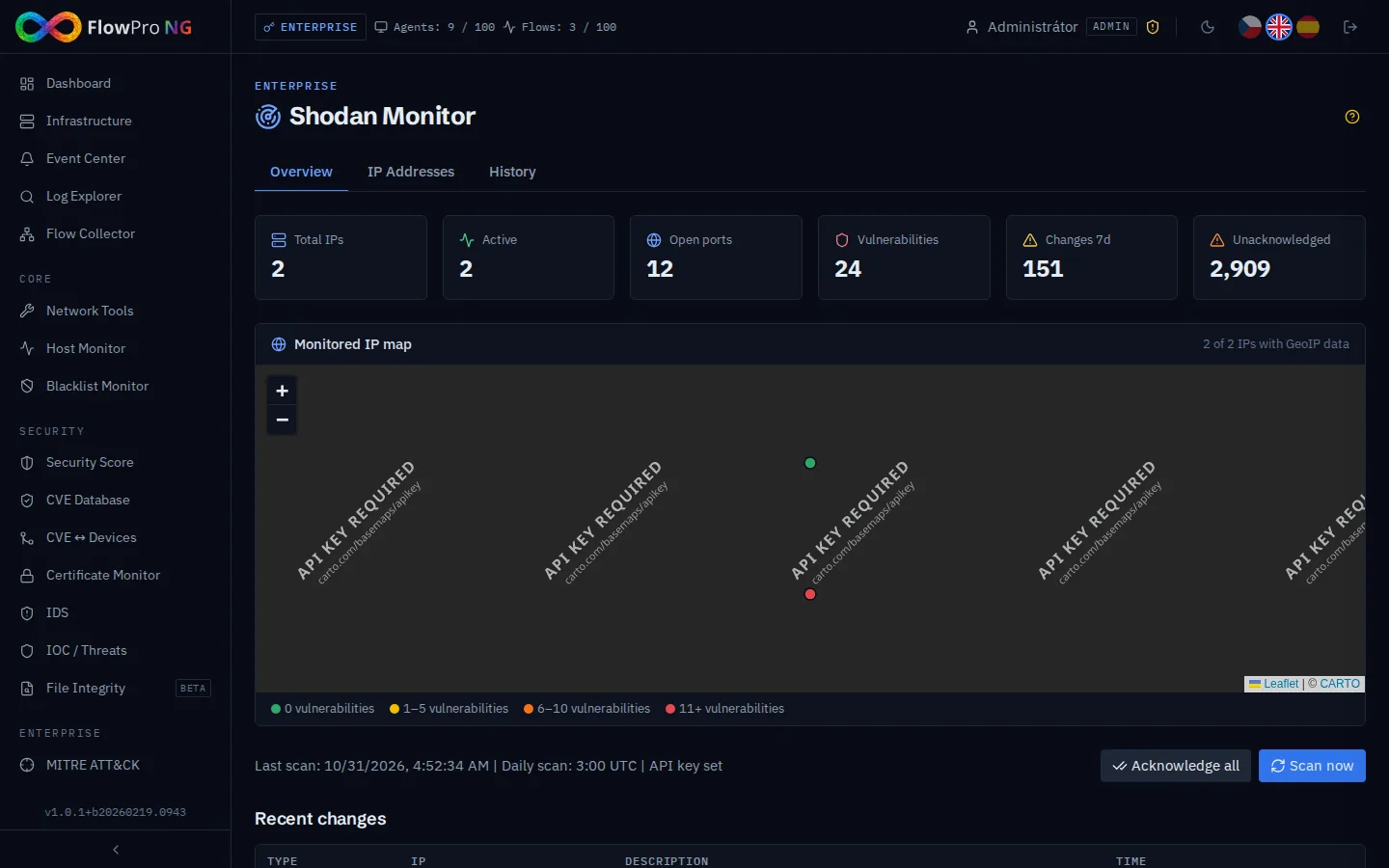
Tab: Overview
Statistic cards display summary metrics:
| Card | Description |
|---|---|
| Total IPs | Total number of monitored IP addresses |
| Active | Number of IP addresses with active services |
| Open Ports | Total number of open ports across all IPs |
| Vulnerabilities | Number of discovered CVE vulnerabilities |
| Changes | Number of detected changes in the selected period |
| Unacknowledged | Number of unacknowledged changes waiting for review |
Tab: IP Addresses
Management of monitored public IP addresses of your organization.
Adding and removing IPs
- •Add IP — enter a public IP address into the form
- •Remove — click the trash icon next to a specific IP
- •Bulk add — multiple IP addresses at once
IP address detail
For each monitored IP, the following is displayed:
- •Open ports — list of internet-accessible ports with service names
- •Running services — software version detection (Apache, nginx, OpenSSH, ...)
- •SSL/TLS certificates — validity, issuer, configuration
- •Vulnerabilities — CVEs found on detected services with CVSS score
- •Organizational metadata — ASN, ISP, geolocation
- •Map — geographic location of the IP address
CVE drilldown
Clicking on a CVE vulnerability displays details including:
- •CVE ID and vulnerability description
- •CVSS score — severity rating (0-10)
- •Affected services — on which ports the vulnerability was found
- •References — links to patches and advisories
The module displays data from Shodan.io. Results may be delayed (Shodan scans the internet continuously, not on demand). For current status, use Network Tools → Port Scan.
Tab: Change History
The system tracks changes on monitored IP addresses and generates records. Change types:
| Change Type | Description | Severity |
|---|---|---|
| new_port | A previously undetected port is now accessible | High |
| closed_port | A port that was open is now unavailable | Low |
| new_vuln | A new CVE was found on the service | High |
| service_change | Change in service version or type | Medium |
| cert_change | SSL certificate was renewed or expired | Medium |
Acknowledge workflow
Each change can be acknowledged to mark it as reviewed:
- •Unacknowledged changes — displayed with a prominent indicator
- •Acknowledge — confirmation that the change has been reviewed
- •Filter — option to display only unacknowledged changes
Set up notifications on a Telegram or Slack channel for immediate alerts on newly opened ports — this may indicate a compromise. Configure in Settings → Notifications.
Export
Shodan data can be exported:
- •CSV — tabular format for Excel and analysis
- •JSON — machine-readable format with all details