16
Network Tools
Network Tools — overview
Network Tools provide a set of 36+ diagnostic utilities available directly from the web interface. From DNS lookups through SSL audits to comprehensive security analyses. The module contains 12 tabs.
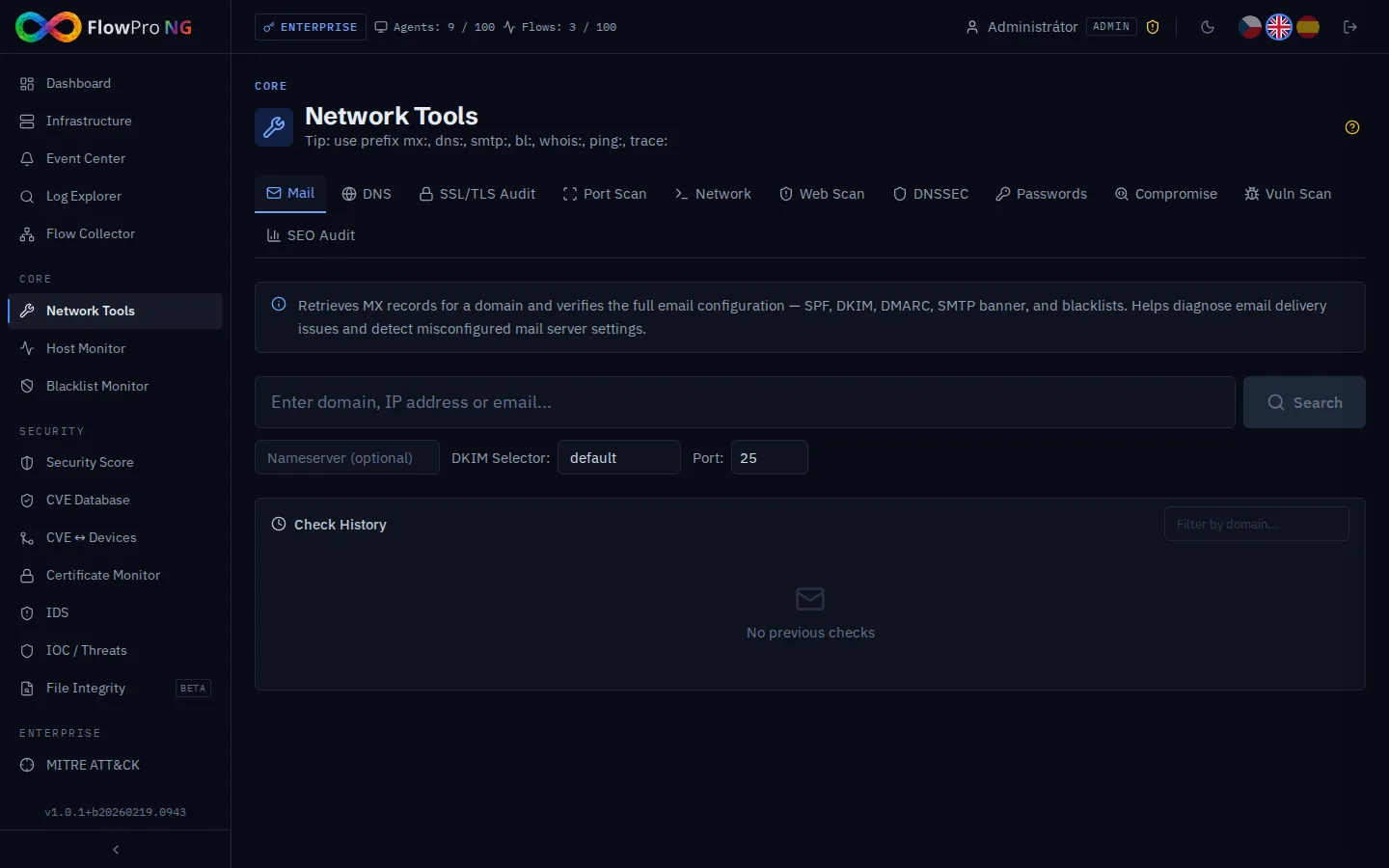
Tabs overview
| Tab | Description | Input |
|---|---|---|
| DNS | DNS lookup (A, AAAA, MX, TXT, CNAME, NS, SOA, SRV, PTR) | Shared search bar |
| MX | MX records with priorities and availability verification | Shared search bar |
| Network | Ping and Traceroute with map and GeoIP | Shared search bar |
| Port Scan | TCP port scanning (quick/standard/full/custom) | Shared search bar |
| SSL | SSL/TLS audit (certificate, protocols, headers, cookies, CAA) | Shared search bar |
| WebScan | Web application security scan | Own form |
| DNSSec | DNSSEC audit with A+ to F grading | Own form |
| Password | Password audit and email breach check | Own form |
| Compromise | Compromise assessment (IoC, typosquat, breaches) | Own form |
| Forensic | Forensic analyses (brute-force, impossible travel, ...) | Own form |
| VulnScan | Vulnerability scan with CVE matching | Own form |
| SEO | SEO analysis of a web page | Own form |
DNS and MX
DNS Lookup
DNS record querying for a given domain. Supported types: A, AAAA, MX, TXT, CNAME, NS, SOA, SRV, PTR.
MX Lookup
MX record query (mail exchangers) with priorities and mail server availability verification. Additionally checks SPF, DKIM, and DMARC records.
Network Tools (Ping / Traceroute)
Ping
ICMP ping with real-time result streaming via WebSocket. Displays RTT (round-trip time), packet loss, and GeoIP information about the target. Results are visualized on a Leaflet map.
Traceroute
Network path tracing with visualization of individual hops on a map. Each hop displays:
- •IP address and hostname (reverse DNS)
- •RTT (round-trip time) in milliseconds
- •GeoIP — country, city, ISP
- •Map visualization — points connected by lines
Both ping and traceroute stream results in real time via WebSocket with progressive rendering.
Port Scan
TCP port scanning on a target address. Available profiles:
- •Quick — top 100 most common ports
- •Standard — top 1000 ports
- •Full — all 65535 ports (may take several minutes)
- •Custom — custom port list
Results are streamed via WebSocket and displayed in real time.
Security Audits
SSL/TLS Audit
Comprehensive SSL/TLS server configuration audit. Checks:
- •Certificate — validity, chain of trust, CN/SAN
- •Protocols — TLS 1.2/1.3 support, disabling SSL 3.0 and TLS 1.0/1.1
- •Cipher suites — security of cipher suites
- •Security headers — CSP, X-Frame-Options, X-Content-Type-Options, Referrer-Policy, Permissions-Policy, X-XSS-Protection
- •HSTS — HTTP Strict Transport Security
- •OCSP — Online Certificate Status Protocol stapling
- •Cookies — Secure, HttpOnly, SameSite attributes
- •DNS CAA — Certificate Authority Authorization records
- •Server info — web server and version detection
The result includes an overall grade (A+ to F) with a detailed point breakdown and recommendations for improvement. Results are saved to history.
Web Scan
Web application security scan. Checks headers, server configurations, misconfigurations, and basic vulnerabilities. Results are saved.
DNSSEC Audit
Comprehensive DNSSEC configuration audit of a domain. Checks the chain of trust from root servers, signature validity, and DS record correctness. Grades: A+, A, B, C, D, E, F.
Vulnerability Scan
Vulnerability scan on a target server. Detects open ports, service versions, and matches them with the CVE database. Results are saved.
Password and Account Security
Password Audit
Password strength check and verification whether it has been compromised in known data breaches (Have I Been Pwned API).
Email Breach Check
Check whether an email address was part of a known data breach. Uses the Have I Been Pwned API (requires HIBP API key in Settings → API Services). Breached email check results are automatically recorded in system events.
Forensic Tools
Compromise Assessment
Comprehensive infrastructure compromise assessment. Combines IoC indicator checks, domain typosquatting, and data breach analysis.
Forensic Tools
A set of forensic tools for analyzing security incidents:
- •Brute-force analysis — detection of password cracking attempts
- •Impossible travel — logins from geographically impossible locations
- •Lateral movement — detection of attacker's lateral movement in the network
- •Privilege escalation — detection of privilege escalation
- •Timeline — chronological overview of activities of a suspicious account/IP
API Keys
Some tools require API keys from external services. Keys are configured in Settings → API Services:
| Service | Usage | Required for |
|---|---|---|
| HIBP API Key | Have I Been Pwned — breach checking | Email Breach Check |
| VirusTotal API Key | File and URL analysis | Compromise Assessment |
| OTX API Key | AlienVault OTX — threat intelligence | Compromise Assessment |
Results History
All audits (SSL, WebScan, DNSSEC, VulnScan, Compromise) are automatically saved to the database. You can view them, compare, and track improvements over time.