34
Active Directory
Active Directory — overview
The Active Directory module connects FlowPro NG to your Windows domain over LDAPS (read-only). It regularly reads users, computers, groups, organizational units and group policies, audits the security of identities, tracks changes between syncs and links domain computers to FlowPro assets.
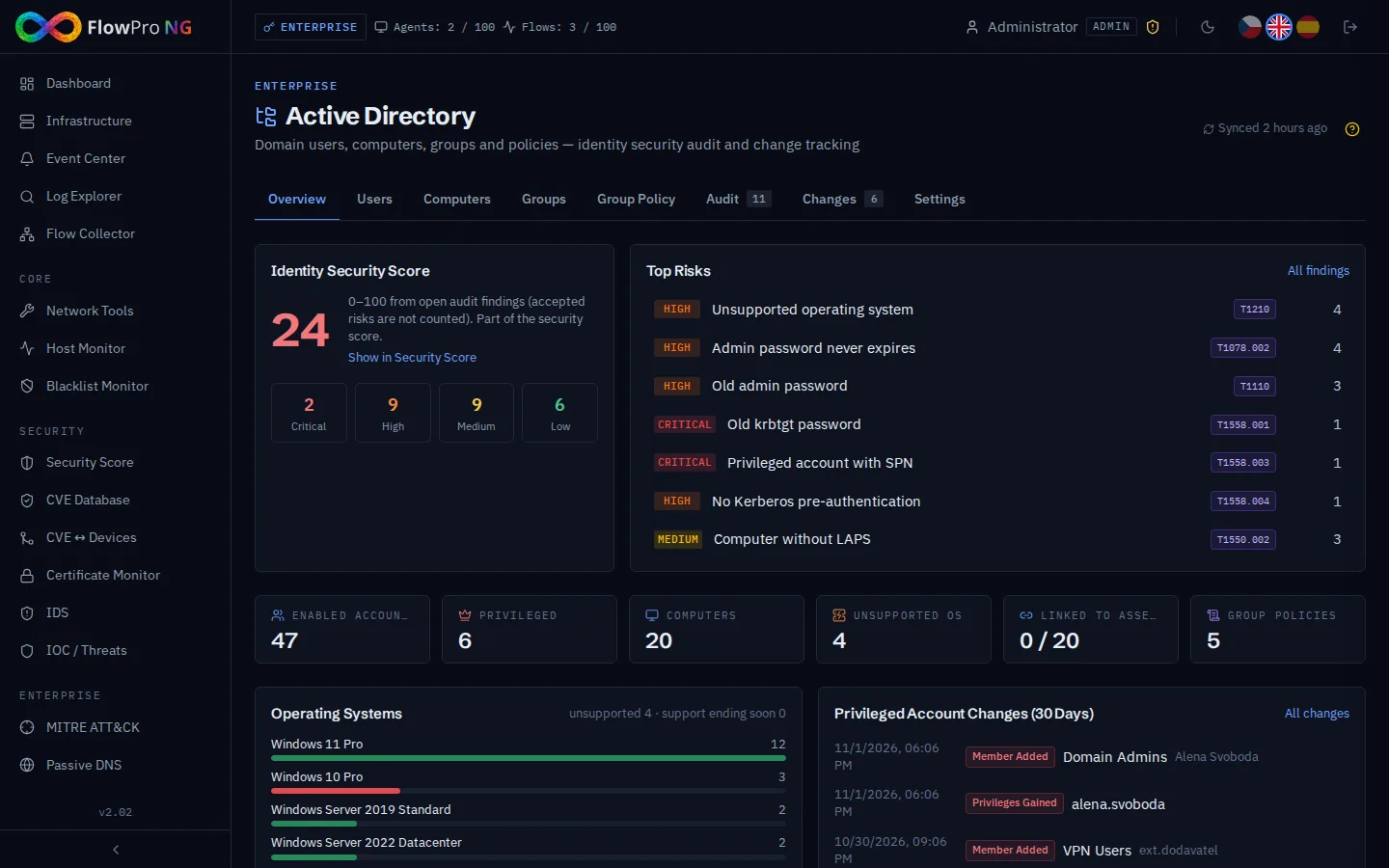
- •Multiple domains — each connection has its own sync interval (default 15 minutes); the page can be filtered to one domain
- •Security audit with 27 checks (Kerberos, privileged accounts, password policy, unsupported systems, LAPS, group policy) mapped to MITRE ATT&CK
- •Privileged accounts recognised by well-known SID, nested groups and primary group — independent of the Windows language
- •Change history — new admins, disabled accounts, new domain controllers, Kerberos settings, GPO changes
- •Integration: Event Center, playbooks, Security score, NIS2 compliance, assets and CVE
Connecting a domain
Prepare a read account
Create a dedicated account in AD. A regular Domain User is enough — FlowPro only reads the directory and never writes to it. Do not use an administrator account.
Enable LDAPS on the domain controller
The module connects only over LDAPS (TCP 636, TLS). The domain controller needs a server certificate (AD CS or another CA) and port 636 must be reachable from the FlowPro server.
Add and test the connection
In Settings click Add Connection, fill in the fields and click Test before saving. The test reports the controller name, naming context and TLS version, or a clear reason of the failure (credentials, certificate, timeout, DNS, refused connection, wrong Base DN).
Bind DN:  CN=svc-flowpro,CN=Users,DC=firma,DC=local   (or svc-flowpro@firma.local)
Base DN:  DC=firma,DC=local
Port:     636 (LDAPS)
First sync
The first sync is the baseline — it records the current state, runs the audit and creates one summary event. Changes are reported from the second sync on.
Users
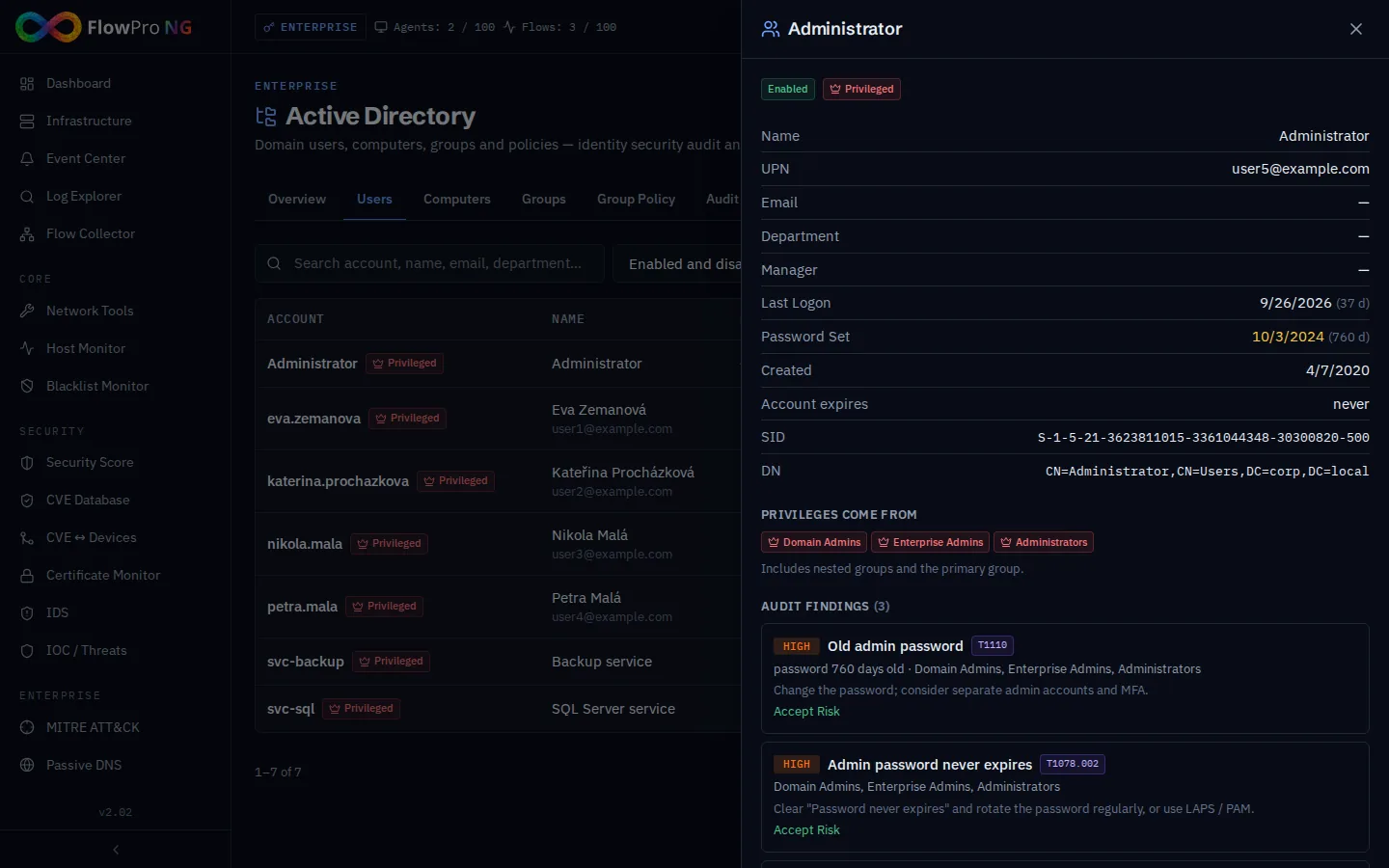
The Users tab lists accounts with last logon, password age, state and the number of open audit findings. Filter by state, privileges or findings and sort by the longest time without logon or the oldest password. Filters are part of the URL, so the view can be shared.
Computers and assets
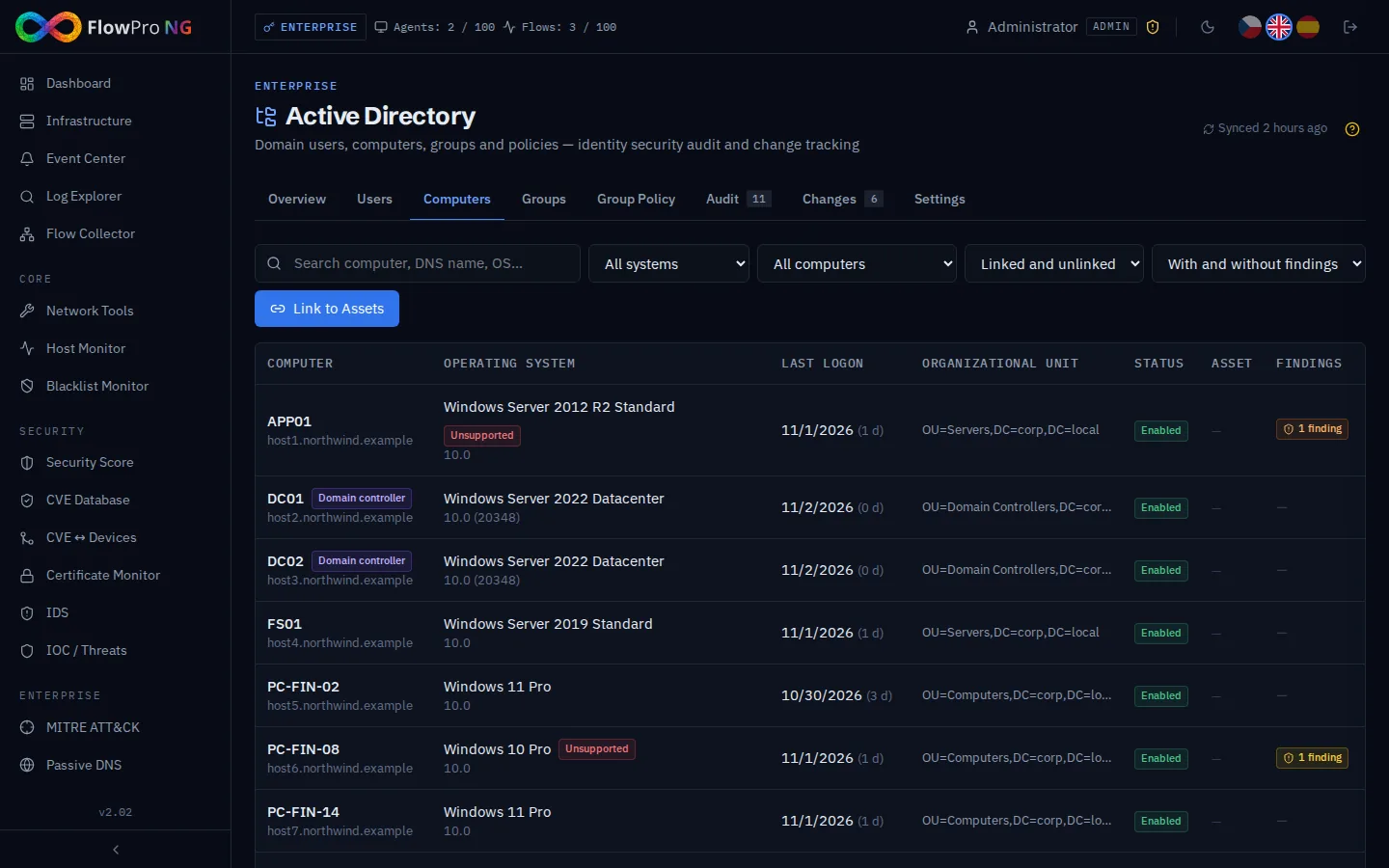
The Computers tab shows operating systems with support status (red = no security updates, amber = support ends soon), domain controllers, the linked FlowPro asset and audit findings.
Linking to assets
After every sync (and with the Link to Assets button) FlowPro links computers to assets — first by name (computer name or FQDN equals the asset host name), then by IP address resolved from Passive DNS. Manual links are never changed. A linked asset shows the AD computer account on its detail page; an empty OS version of the asset is filled from AD, which improves CVE matching.
Groups
Privileged groups are detected by well-known SID — Domain Admins (…-512), Schema Admins (…-518), Enterprise Admins (…-519), Group Policy Creator Owners (…-520), Key Admins, and the BUILTIN groups Administrators, Account/Server/Print/Backup Operators — plus DnsAdmins by name. Any group nested in them is privileged too, and so is every user who gets there directly, through nesting or by primary group.
Group policy
The Group Policy tab lists GPOs with versions, state and the OUs they are linked to (including links at the domain root). The change history records new, modified, deleted, linked and unlinked policies. A change of the Default Domain Policy or the Default Domain Controllers Policy creates an event in the Event Center.
Security audit
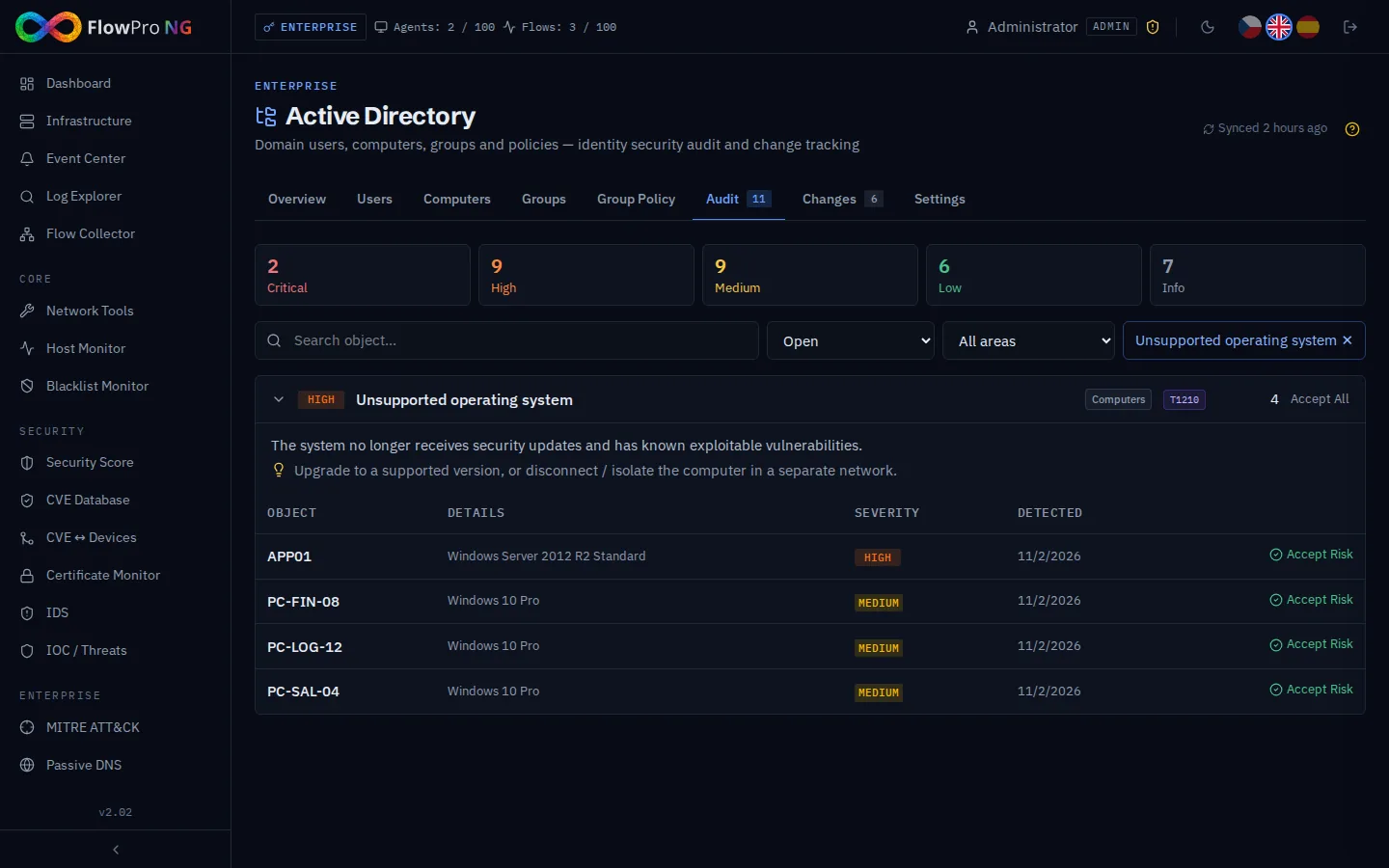
The audit runs after every sync. Findings are grouped by type; each type has a description, a recommendation and MITRE ATT&CK techniques (the badge opens the technique). Click a severity card or an area to filter, expand a type to see the objects.
| Area | Checks |
|---|---|
| Kerberos | Kerberoastable accounts (SPN), no pre-authentication (AS-REP roasting), unconstrained delegation, krbtgt password older than the limit (Golden Ticket risk) |
| Privileged accounts | Admin with SPN, password never expires, old admin password, too many Domain Admins, disabled account in a privileged group, orphaned adminCount, list of privileged accounts |
| Accounts | Password not required, reversible encryption, inactive account, never logged on, old password, password never expires |
| Domain policy | Weak password policy (length, complexity, history), no account lockout, users may join computers (MachineAccountQuota) |
| Computers | Unsupported operating system (critical on a domain controller), LAPS not deployed / missing, stale computer |
| Group policy | Critical GPO disabled, disabled GPO still linked, unlinked GPO |
Accepting a risk
A finding disappears automatically once the cause is fixed in AD. If the risk is intentional (e.g. an isolated legacy system), an analyst or administrator accepts it with a reason and optionally an expiry date. Accepted findings do not reopen with the next sync, do not count towards the score and are listed under Accepted Risks with author and reason — evidence for a NIS2 audit. After the expiry date the finding opens again.
Identity security score
The 0–100 score is computed from open, not accepted findings. Each finding type adds points by severity (critical 15, high 8, medium 3, low 1), growing logarithmically with the number of objects — 150 old computers are not 150× worse than one. The score is part of the Security score as the Identities (Active Directory) component with a 10 % weight.
Change history
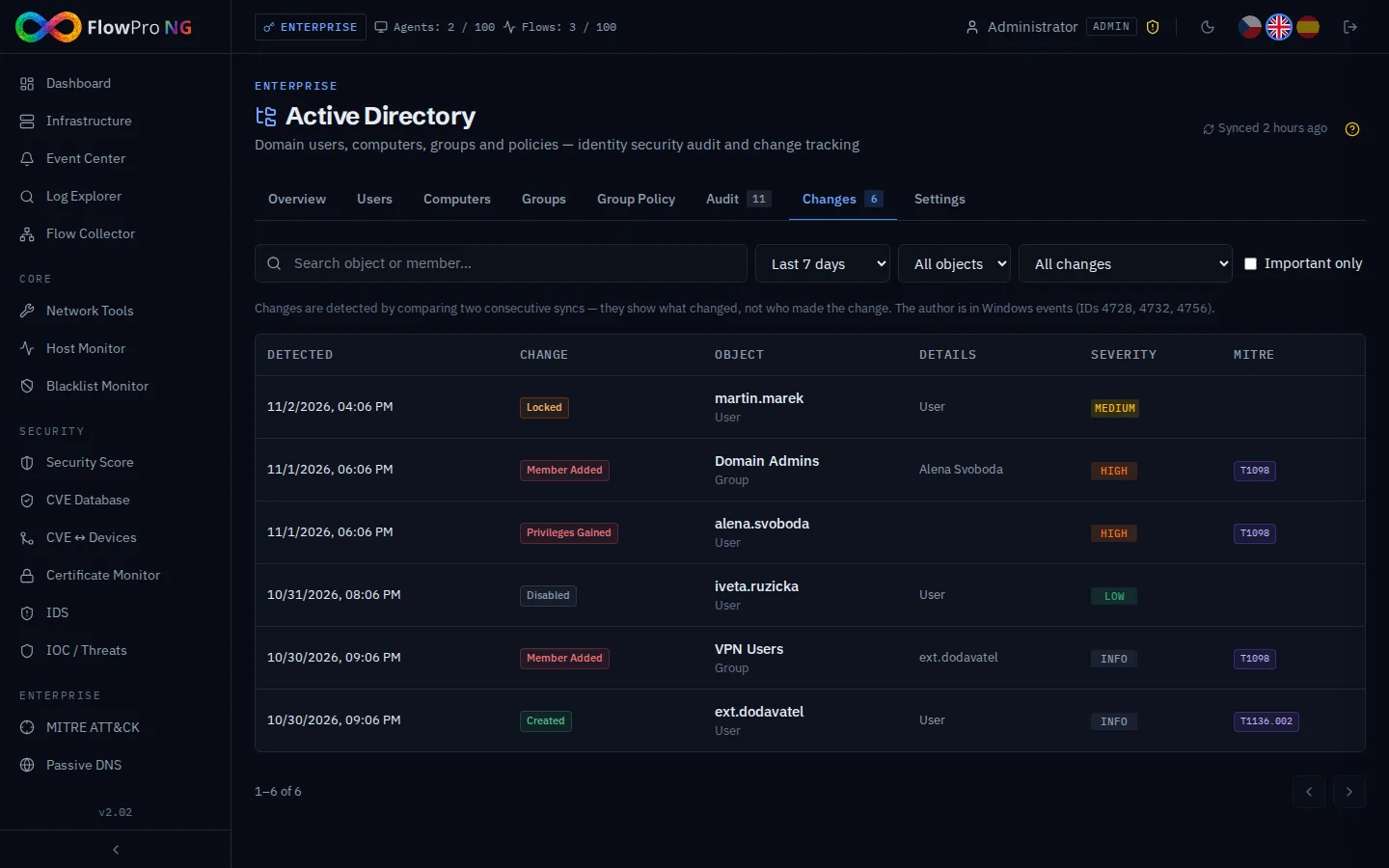
Every sync is compared with the previous one. Recorded are new and deleted objects, enabled/disabled/locked accounts, privileges gained or lost (also through nested groups), members added to or removed from privileged groups, new domain controllers, unconstrained delegation, disabled Kerberos pre-authentication, PASSWD_NOTREQD, password changes of admins and OS changes.
Integration with other modules
| Module | What AD provides |
|---|---|
| Event Center | Source Active Directory: sync failing (from the 2nd failure in a row, closed after success), new privileged account, new domain controller, delegation / pre-auth changes, critical GPO change, new audit findings (one event per type). The Open in Active Directory button jumps to the right tab. |
| Playbooks | Trigger source "Active Directory" — e.g. notify the security team or call a webhook when someone becomes a Domain Admin. |
| Security score | Component Identities (Active Directory), weight 10 %, with improvement actions per finding type. |
| NIS2 compliance | Automatic controls AD-1 … AD-6: sync current, no critical findings, hardened privileged accounts, inactive accounts disabled, password and lockout policy, supported systems. Without a connected AD they are not applicable. |
| MITRE ATT&CK | Every finding type and important change carries technique IDs (T1558.003, T1558.004, T1098, T1484.001, T1210 …) linking to the MITRE page. |
| Assets and CVE | Automatic linking of computers to assets, AD card on the asset detail, OS version for CVE matching, link to vulnerabilities of the computer OS. |
| Windows Events, Honeypot | User enrichment of Windows logons; honeypot alerts when attackers try real domain account names. |
Settings
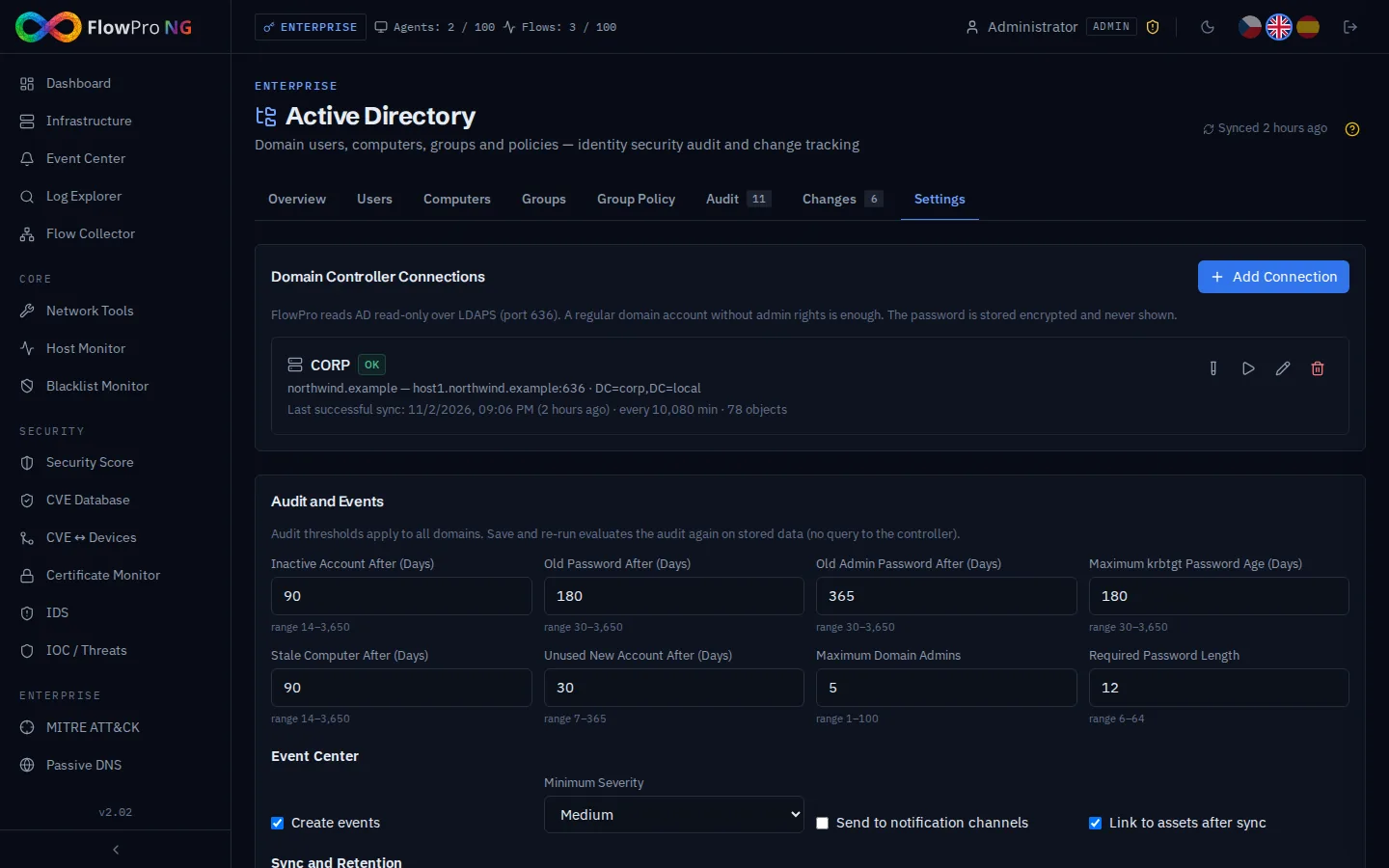
Settings (administrators only) contain the connections, audit thresholds, Event Center options and retention. After changing thresholds use Save and Re-run Audit — the audit is evaluated on stored data without querying the controller.
| Setting | Default | Meaning |
|---|---|---|
| Inactive account after | 90 | Days without logon of an enabled account |
| Old password after | 180 | Regular accounts |
| Old admin password after | 365 | Privileged accounts |
| Maximum krbtgt password age | 180 | Over 3 years the finding is critical |
| Maximum Domain Admins | 5 | Enabled effective members incl. nested groups |
| Required password length | 12 | Compared with the Default Domain Policy |
| Deletion guard | 50 % | If more objects of a type disappear at once, deletion is paused and the sync is marked Incomplete |
| Event Center | on, Medium | Minimum severity of created events; notification channels optional |
| History retention | 90 / 365 days | Sync history (the last 50 per domain always kept) / object and GPO changes |
Roles
Everyone with the module sees the inventory, audit and changes. Analysts and administrators also accept risks, link assets and start a sync. Only administrators manage connections (bind credentials) and settings.
Troubleshooting
| Problem | Solution |
|---|---|
| Server does not respond (timeout) | Port 636 is blocked by a firewall or the VPN to the customer network is down. The connection test gives up after 10 seconds. |
| TLS certificate error | Paste the domain CA certificate (PEM) into the connection and use the server name from the certificate instead of an IP address. |
| Invalid credentials | Check the Bind DN (full DN or user@domain) and the password; the account must not be locked or expired. |
| Banner "data are out of date" | The last successful sync is older than four intervals. Inventory and audit show the last known state; the error is shown in Settings and in the Event Center. |
| Sync marked Incomplete | The controller returned far fewer objects than last time (Base DN changed, permissions). Nothing was deleted; fix the cause or raise the deletion guard if the change is real. |
| No domain policy shown, LAPS not detected | The bind account cannot read the domain object or the LAPS attributes; grant read access or check the Base DN. |