36
File Integrity (FIM) — beta
File Integrity Monitoring — overview
File Integrity Monitoring watches important system files on servers and workstations with Elastic Agent and records every creation, modification, deletion, move and change of permissions or owner. Changes of critical files (accounts, SSH, sudo, cron, systemd, system programs) become events in the Event Center, are evaluated in the Security score and NIS2 compliance and mapped to MITRE ATT&CK.
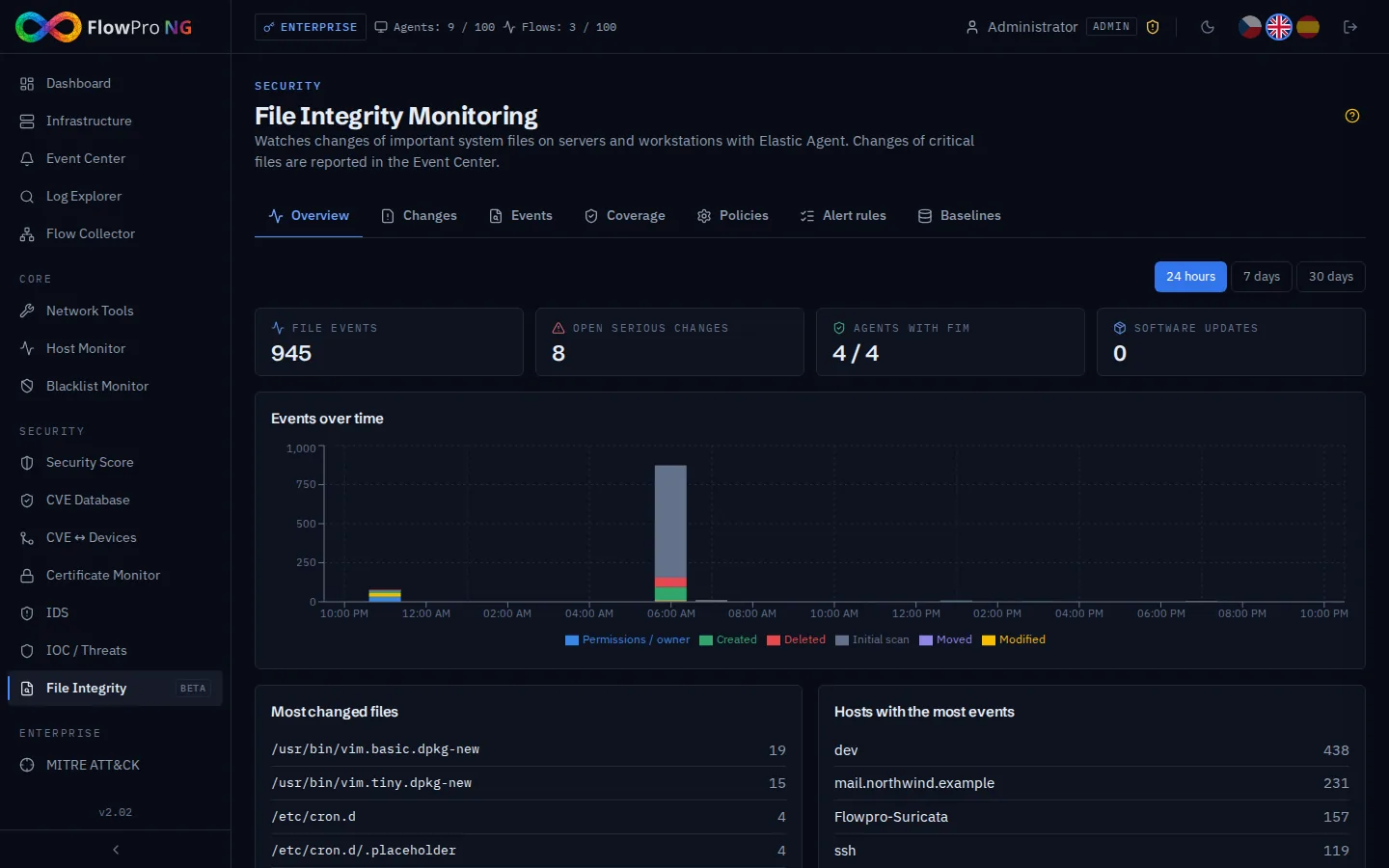
| Tab | Contents |
|---|---|
| Overview | KPIs, timeline by action, most changed files and hosts, newest open changes |
| Changes | What the alert rules caught, software updates and FIM outages — acknowledge expected changes |
| Events | All raw file events with filters and detail (hash, owner, permissions, process) |
| Coverage | NIS2 controls FI-1..3, FIM health per agent, Fleet sync, settings |
| Policies | What is watched on which Fleet policies (Linux / Windows) |
| Alert rules | Which changes become events, severity, cooldown, MITRE technique, test |
| Baselines | Approved snapshots of a host and their comparison with the current state |
How it works
- •Collection — the Elastic Agent integration "File Integrity Monitoring" (input audit/file_integrity) sends file events to the data stream logs-fim.event-default. After a change of the watched paths the agent performs an initial scan ("initial scan" events).
- •Policies → Fleet — FlowPRO policies are the source of truth: every 10 minutes and right after each change FlowPRO writes the watched paths, exclusions and hashes into the FIM integration of every Fleet policy. Duplicate FIM inputs are removed. Agents are never restarted.
- •Evaluation — every minute FlowPRO reads the new events (nothing is skipped, even thousands at once), keeps the last known state of every file per host and matches the alert rules. Matches are grouped per rule and host; during the cooldown they wait and are reported with the full count afterwards.
- •Software updates — changes made by the package manager (dpkg/rpm temporary files, package processes, or a burst of changes in system directories) are reported as one informational "Software update" event per host at most every 6 hours instead of thousands of alerts.
- •Coverage — FIM health per agent is read from the Fleet component status. A quiet server without changes is healthy; an agent whose FIM input disappears or fails raises the event "FIM is not running".
Deployment
Install Elastic Agent
Check the coverage
Adjust the policies and rules
sudo elastic-agent status            # audit/file_integrity: HEALTHY
sudo elastic-agent inspect | grep -A20 file_integrity   # watched paths written by FlowPRO

# test change — appears in File Integrity -> Changes within ~2 minutes
echo "# test" | sudo tee /etc/cron.d/zz-fim-test && sudo rm /etc/cron.d/zz-fim-test
Changes and acknowledgement
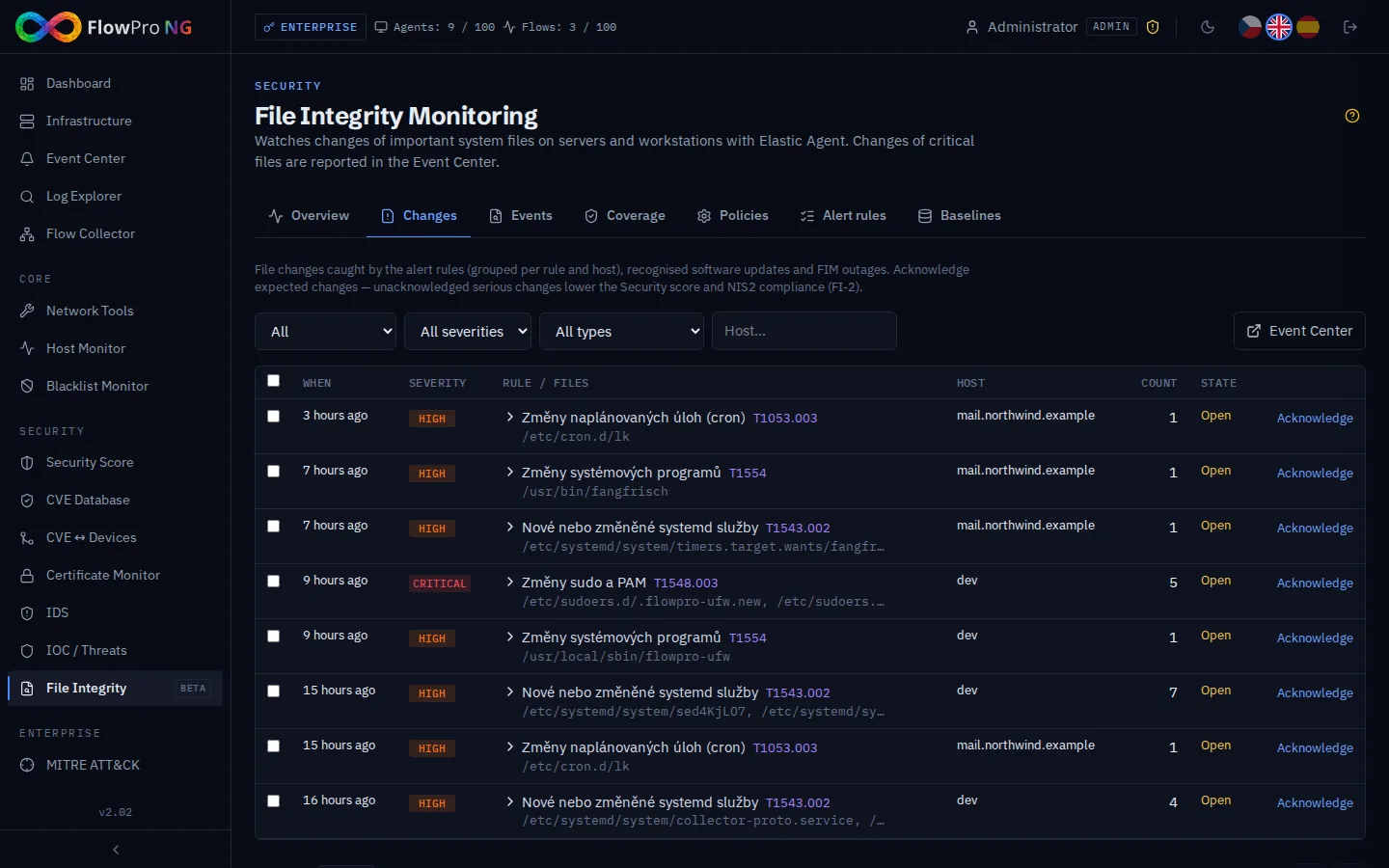
- •Each row is one Event Center event (source "File integrity"): rule, host, number of changes, sample files with action, SHA-256, process and time.
- •Acknowledge (analyst, administrator) marks a change as expected, with an optional note — the audit trail of approved changes required by NIS2 change management. Several changes can be acknowledged at once.
- •Open critical and high changes lower the Security score; those older than 7 days fail the NIS2 control FI-2.
Events
All file events from the agents — filter by host, path, action and period (up to 90 days). A click opens the detail with owner, permissions, size, hashes, modification time, inode and, with the eBPF source, the process and user. Filters are kept in the URL, so a view can be shared.
| Action | Meaning |
|---|---|
| Created / Modified / Deleted | Content of the file changed (new SHA-256) |
| Permissions / owner changed | chmod / chown — e.g. /etc/shadow readable by everyone |
| Moved | Renamed or moved file (typical for package updates and editors) |
| Initial scan | State of a file found when the agent (re)started watching a path — not a change |
Coverage, NIS2 and settings
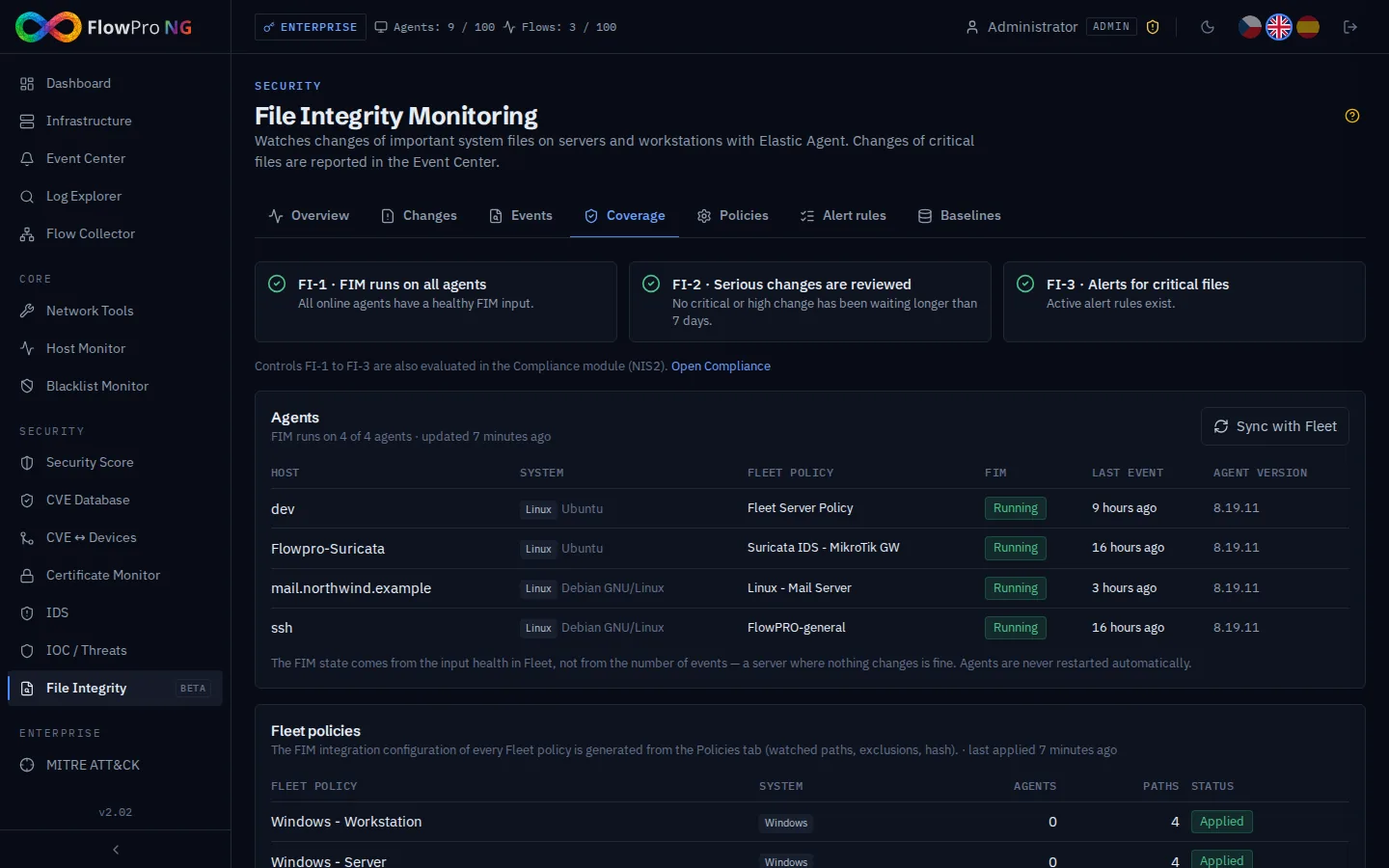
| Control | Passes when |
|---|---|
| FI-1 | Every online Fleet agent has a healthy FIM input |
| FI-2 | No critical or high change waits for review longer than 7 days |
| FI-3 | At least one active alert rule exists in an active policy |
The controls are evaluated in the Compliance module (NIS2, category System integrity) as well. Fleet policy statuses: Written — FlowPRO manages the FIM integration; Without FIM — no FlowPRO policy targets it; Managed outside FlowPRO — FIM was configured in Kibana by hand and is left alone; Error — see the message.
- •Notification channels + minimum severity — where file change events are sent (e-mail, Teams, Slack, webhook …).
- •Report software updates / burst threshold — the number of changes in system directories within one minute that marks a host as being updated for 15 minutes.
- •Report FIM outage and recovery on an agent; Write policies to Fleet automatically (turn off only when the FIM integration is managed in Kibana).
Policies
A policy defines the operating system, the watched paths (directories are watched recursively), excluded paths, hash algorithms, the event source on Linux and the target Fleet policies (empty = all Fleet policies of that OS). The operating system of a Fleet policy is taken from its agents (or its name when it has none). Several policies on one Fleet policy are merged.
| Template | Watches |
|---|---|
| Linux – baseline (NIS2) | Accounts, sudo, PAM, SSH incl. /root/.ssh, cron, systemd units, ld.so, profile.d, hosts, system and local programs |
| CIS Benchmark | Baseline + audit rules, GRUB, fstab, sysctl |
| PCI-DSS | Baseline + audit rules and rsyslog configuration |
| Web server | Baseline + nginx, Apache, Let's Encrypt, PHP configuration |
| Windows | hosts file, startup folder, scheduled tasks, Group Policy |
Alert rules
A rule belongs to a policy and applies to its hosts. Path patterns use * and ? (e.g. /etc/ssh/*, */.ssh/authorized_keys; Windows paths are case-insensitive). The cooldown limits how often one rule reports the same host — changes in the meantime are not lost, they are added to the next event. The MITRE technique puts the change into the ATT&CK matrix. "Test" shows how many events of the last 7 days the rule would have caught.
| Default rule | Severity | MITRE |
|---|---|---|
| Authentication files (passwd, shadow, group) | Critical | T1098 |
| SSH configuration and keys | High | T1098.004 |
| sudo and PAM | Critical | T1548.003 |
| Scheduled tasks (cron) | High | T1053.003 |
| systemd services | High | T1543.002 |
| Library preload (ld.so) | Critical | T1574.006 |
| System programs (outside package updates) | High | T1554 |
| Windows: hosts, startup items, scheduled tasks | High | T1565.001 / T1547.001 / T1053.005 |
Baselines
A baseline is an approved snapshot of the files of one host (hash, owner, group, permissions) within a policy's paths, taken from the file state that FlowPRO builds from the FIM events (including the agent's initial scan). The comparison shows files that were added, removed or modified (with old and new hash / owner / permissions) since the snapshot and the number of change events since then. Take a baseline after installation or an approved change; analysts and administrators can create it.
The panel "Known files of the host" lists the last known state of every watched file and allows searching and showing deleted files.
Links to other modules
| Module | What FIM provides |
|---|---|
| Event Center | Events of source "File integrity" (changes, software updates, FIM outages, Fleet write errors) incl. notifications |
| Security score | Area "File integrity": agents without FIM and open critical / high / medium changes |
| Compliance (NIS2) | Automatic controls FI-1, FI-2, FI-3 |
| MITRE ATT&CK | Source "File integrity" — detected techniques from rule matches, coverage from active rules |
| Scenarios | Trigger source "File integrity" (e.g. notify the server owner, open a ticket) |
| Asset detail | Card "File integrity" — FIM status, tracked files, events in 7 days, open changes |
| Data retention | Category "FIM" in Settings → Data retention |
Troubleshooting
| Symptom | Cause and fix |
|---|---|
| Agent shows "Missing" | No FlowPRO policy targets its Fleet policy (OS mismatch or explicit targets) or the Fleet policy is "Managed outside FlowPRO". Adjust the targets and click Sync with Fleet. |
| Agent shows "Error" | The FIM input failed on the agent (message in the row) — e.g. eBPF not supported by the kernel: switch the source back to auto. |
| Too many events | A watched path contains changing data — exclude it in the policy. Many "initial scan" events right after a policy change are expected once. |
| No process / user in events | The fsnotify source does not provide them — choose eBPF in the policy. |
| Changes during an update reported as changes | The update changed fewer files per minute than the burst threshold — lower it in Coverage → Settings, or use eBPF so the package manager process is recognised. |