35
Extended Data Retention
Extended Data Retention — Overview
The Extended Data Retention add-on helps internet service providers meet the traffic-data retention duty (Czech §97 of the Electronic Communications Act and Decree 357/2012). It keeps a register of which client used which IP address and when, guarantees that flows are kept for the legal period, answers "who used this IP address at that time" requests from the authorities, and logs every access to the retained data.
License: add-on "Extended Data Retention" (available for any paid tier; included in the trial).
| Tab | Purpose | Role |
|---|---|---|
| Overview | Readiness checklist and flow retention | admin, analyst |
| Clients | Current register, assignment history, CSV import | admin, analyst (import: admin) |
| Lookup | Who used an IP[:port] at a given time, PDF report | admin, analyst |
| Service types | Labels for connection types | admin, analyst (edit: admin) |
| Synchronization | ISPadmin connection and sync history | admin |
| Access audit | Who accessed retained data | admin |
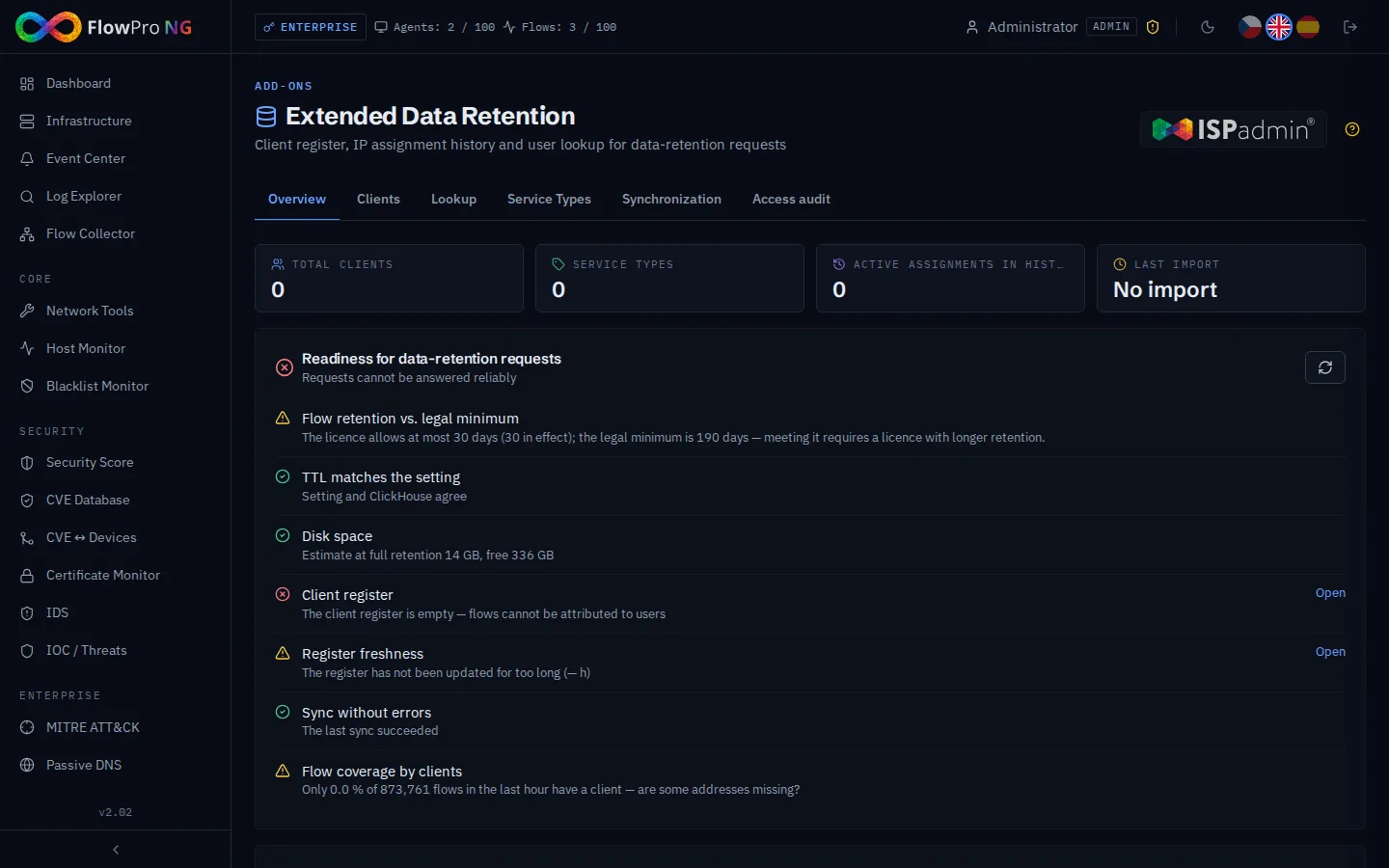
Readiness Checklist
The Overview tab checks whether the instance can answer a data-retention request right now. Red items mean a request cannot be answered reliably (empty register, failing sync), amber items are warnings — including a retention shorter than the legal minimum.
| Check | Meaning |
|---|---|
| Flow retention ≥ legal minimum | The TTL actually applied in ClickHouse keeps flows for at least 190 days (6 months + margin). A warning distinguishes whether the licence or the setting is shorter. |
| TTL matches the setting | The value in Settings → Data retention is really in effect. |
| Disk space | Estimated size at full retention (current daily growth × days) vs. free space. |
| Client register | At least one client is registered. Critical. |
| Register freshness | Last successful sync within 36 h (with ISPadmin) or import within 31 days. |
| Sync without errors | The last ISPadmin sync succeeded. Critical. |
| Flow coverage | Share of last-hour flows whose source or destination maps to a client — a low value suggests missing addresses or ranges. |
Flow Retention and the Legal Minimum
The maximum flow retention is set by the licence tier (Free 30, Core 180, Security 365 days, Enterprise unlimited); in Settings → Data retention you can choose a shorter period. The legal minimum for traffic data is 6 months (190 days with a margin). The Overview tab compares the configured value with the TTL really set on ClickHouse and with the licence cap, and shows how many days the data covers, the daily growth and the estimated disk usage.
- •"Set TTL to the configured value" — applies the stored setting to ClickHouse (fixes drift)
- •"Raise to the legal minimum" — sets and saves 190 days; if the licence allows less, "Raise to the licence maximum" sets the licence cap instead
- •A retention below the legal minimum is reported as a warning — it is the administrator's decision (or a licence limit), not an error
- •Settings → Data retention marks the flows row "below legal minimum" when it is shorter
Client Register and Assignment History
The Clients tab shows the current state of the register. Every change — from an import or an ISPadmin sync — is also written to the assignment history: when an address moves to another client, the old assignment is closed and a new one opened. Flow search, the regulatory export and the lookup always use the assignment that was valid at the time of the flow, not today's state.
- •Search by IP, name, MAC, client number, street or city (accent-insensitive)
- •History icon — all assignments of the address over time
- •Lookup icon — opens the Lookup tab prefilled with the address
- •Map icon — client location when GPS coordinates are known
CSV Import
- •Admin only. Click "Import clients", drop the file, check the 5-row preview and confirm.
- •The file is a full snapshot: clients missing from it are recorded as removed from now on — the history is kept.
- •The result shows how many clients were added, changed and removed.
- •The table is swapped atomically, so flow enrichment never sees an empty or half-written register.
| Column | Required | Description |
|---|---|---|
| ip | Yes | IPv4/IPv6 address, an IPv4 range up to /20 (e.g. 203.0.113.8/29) or a delegated IPv6 prefix /48, /56, /60, /64 |
| client_name | Yes | Client name ("user designation" in the regulatory export) |
| client_number | No | Client number from the billing system |
| client_id | No | Account identifier ("user account identifier") |
| mac | No | MAC address of the customer device |
| service_type | No | Numeric connection-type code (labelled in Service types) |
| ap / essid | No | Access point and Wi-Fi network name |
| street / city / zip / ruian | No | Installation address and RÚIAN code |
| latitude / longitude | No | GPS position (decimal point or comma) |
Lookup: Who Used an IP Address
The Lookup tab answers the typical request "who used IP address X (port Y) on date Z". It searches flows on both sides and both before and after NAT, so it works for public addresses behind CGNAT and for port-forwarded (DNAT) traffic.
- •Enter the IP address, optionally the port, the local time and a tolerance (exact to ± 1 h)
- •Optionally fill in the request reference number and the requester — they appear in the report and the audit
- •"Users at that time" — the clients found, with ID, client number, address, MAC and the first/last matching flow
- •Flow table — the matching flows (the searched side highlighted)
- •"PDF report" — a protocol with the request reference, requester, operator, query and results, ready to hand over
Regulatory Flow Export
In Flow collector → Flows, the export button (part of this add-on) offers a standard and a regulatory export (CSV, XLSX, PDF). The regulatory export uses the fixed layout of Decree 357/2012: connection type, user designation, account identifier, MAC, start and end, source, destination and post-NAT IP:port, volume, protocol, access point, ESSID and GPS.
- •The user is the client valid at the time of each flow (source side, or the destination side for inbound connections)
- •The regulatory CSV is streamed, so even large exports (up to 500 000 rows) do not run out of memory
- •The export endpoint itself checks the add-on and every export is written to the access audit
Service Types
Labels for the numeric service_type codes from the register (e.g. 1 = fibre, 2 = Wi-Fi). The label is used as the "connection type" in the regulatory export. Codes found in the register are listed automatically; an admin can add a label for any code, also one not used yet.
ISPadmin Synchronization
Instead of CSV imports, the register can be pulled daily from an ISPadmin server over its REST API: client name per IP (/internet), client number and ID (/clients) and the installation address (/clients/{id}/services).
- •Server URL — HTTPS only (the API token travels with every request); LAN servers are allowed
- •API token — stored encrypted; leave the field empty to keep the current one
- •Sync time — daily run time (default 01:30); exactly one run per day even with several API workers
- •Test connection / Sync now — the sync runs in the background; the page shows progress and the result
- •Sync history — result of every sync and import with the number of added, changed and removed clients
Access Audit
Retained traffic data may only be used for the purposes set by law, so every access is recorded: flow exports, lookups and PDF reports, register searches and history views, imports, synchronizations and configuration changes — with the user, role, IP address, parameters and number of records. Records are kept for 3 years. Admin only.
Data Retention (Czech Law)
- •Who — public communication network and service providers (ISPs, operators)
- •What — traffic data (who, with whom, when, how long, how they communicated) and location data
- •Duration — 6 months
- •Deletion — after 6 months, data must be deleted unless it was handed over to the authorities
- •Purpose — exclusively for the Czech Police, intelligence services (BIS) or the Czech National Bank
Technical Details
| Parameter | Value |
|---|---|
| Current register | ClickHouse clients + clients_dict |
| Assignment history | clients_history (valid from–to) + time-range dictionary; kept ≥ flow retention + 31 days |
| Sync / import log | edr_sync_log, 2 years |
| Access audit | edr_audit_log, 3 years |
| Legal minimum for flows | 190 days (target; the licence cap applies) |
| Lookup | max. 1 000 flows per query, tolerance up to ± 12 h |
| Import file | CSV / TSV / TXT, 10 MB |